


If you’ve ever bought an MTN bundle and felt it disappeared “overnight,” you’re not alone. Many Nigerians experience rapid data depletion and assume the network is deducting unfairly. In reality, the most common reasons Why MTN Data Finishes Fast in Nigeria are device settings, app behaviour, streaming quality, background activity, Wi-Fi assist features, and hotspot usage, plus a few network and browsing factors that silently multiply consumption.
This guide breaks down the real reasons MTN data finishes fast in Nigeria and gives practical fixes you can apply in minutes—on Android and iPhone—so your data lasts longer without sacrificing essential internet use.
1) Background Apps Are Eating Your Data Without Permission
Many apps remain active even when you’re not using them. They refresh content, sync files, preload videos, update feeds, and send analytics. Common culprits include:
TikTok, Instagram, Facebook (auto-preloading videos)
YouTube (background refresh and previews)
WhatsApp (auto-download media)
Google Photos/Drive (backup sync)
App stores (auto-updates)
Fix (Android)
Settings → Network & Internet → Internet/Data usage → App data usage
Tap heavy apps → enable Restrict background data (or “Background data: Off”).
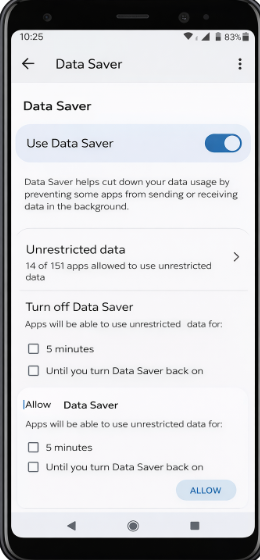
Turn on Data Saver: Settings → Network & Internet → Data Saver → On.
Fix (iPhone)
Settings → Mobile Service → Mobile Data
Turn off mobile data for non-essential apps.
Settings → General → Background App Refresh → Off (or Wi-Fi only).
Quick win: Restrict background data for social apps and cloud backups first; those typically produce the biggest immediate results.
2) Auto-Updates and OS Updates Can Consume Hundreds of MB (or GB)
App updates are larger than most people think, and OS updates can be multiple gigabytes. If updates run on mobile data, your bundle will evaporate fast.
Fix
Android Play Store: Play Store → Settings → Network preferences → Auto-update apps → Over Wi-Fi only
iPhone: Settings → App Store → App Updates → Off (or ensure mobile data for updates is off)
System updates: Set OS updates to download on Wi-Fi only.
Pro tip: Set updates for late night when you have stable Wi-Fi, to avoid repeated “failed downloads” that retry and waste data.
3) Video Quality Defaults Are Too High (Streaming Is the #1 Data Killer)
If you stream TikTok, Instagram Reels, YouTube, Netflix, or even Twitter/X videos, your data usage can jump dramatically because:
Videos auto-play
Apps default to high quality
Short videos load continuously as you scroll
What this means in practice
High-quality video can burn hundreds of MB per hour.
If your apps are set to “High quality on mobile data,” your MTN bundle will finish quickly even with light browsing.
Fixes by platform
YouTube: Settings → Video quality preferences → On mobile networks: Data saver
Instagram: Settings → Data usage → enable Data Saver and disable High-quality uploads
TikTok: Settings → Data Saver → On
Netflix: App Settings → Video Playback → Data Saver (or “Low”)
Extra fix: Disable auto-play in apps where possible (Facebook/Instagram/Twitter/X).
4) Hotspot and Sharing Data Multiplies Consumption
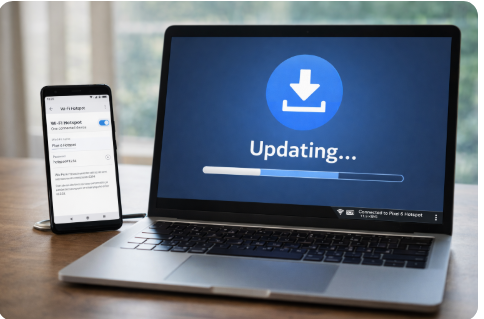
When you turn on hotspot, any connected device can:
Update software
Sync cloud files
Autoplay HD videos
Download large files silently
This is one of the most common hidden reasons people say their MTN data finishes fast—especially if you’ve ever shared data with a laptop.
Fix
Add a hotspot password and change it regularly.
On Android hotspot settings, enable “Turn off hotspot automatically”.
On laptops, set the connection as Metered (Windows) so updates stop.
Avoid streaming on hotspot unless you’ve forced low-quality video.
5) “Wi-Fi Assist / Smart Network Switch” Can Secretly Use Mobile Data
Some phones automatically switch to mobile data when Wi-Fi is weak. In Nigeria, where Wi-Fi may fluctuate, this can cause your phone to consume MTN data even when you believe you’re on Wi-Fi.
Fix (Android)
Settings → Network → Wi-Fi → Advanced
Turn off options like:“Switch to mobile data automatically”
“Adaptive connectivity”
“Smart network switch” (names vary by brand)
Fix (iPhone)
Settings → Mobile Service → Wi-Fi Assist → Off
6) WhatsApp Auto-Downloads and Backups Drain Data
WhatsApp can download every forwarded video and voice note automatically. Backups can also run at the wrong time.
Fix (WhatsApp)
Settings → Storage and data → Media auto-download
Set Photos/Audio/Videos/Documents to Wi-Fi only or Never (for videos).Chats → Chat backup
Ensure backups run on Wi-Fi and not mobile data.
Bonus: Use WhatsApp’s Manage storage to delete heavy media you don’t need.
7) Browsers, Ads, and Heavy Websites Consume More Than You Think
Websites today are heavy: auto-playing videos, large images, tracking scripts, and ads. If you browse news sites, sports sites, and entertainment blogs frequently, your data can go quickly.
Fix
Use Chrome Lite mode alternatives (where available) or Opera Mini for light browsing.
Turn on Data Saver in your browser (Opera has strong compression features).
Use an ad blocker where legally and technically appropriate (note: some sites may restrict access).
8) Malware, Adware, or Rogue Apps Can Drain Data in the Background
If you installed APKs from unknown sources, modded apps, or suspicious “free data” tools, your phone may be running background services that consume data.
Signs of a rogue app
Data drains even when you’re asleep and not using the phone
Phone runs hot
Random pop-up ads
Unknown apps with high data usage
Fix
Check data usage by app and uninstall suspicious items.
Run a reputable mobile security scan.
Avoid installing apps outside official stores unless necessary and verified.
9) MTN Billing Reality: Sessions, Bundles, and Out-of-Bundle Charges
While most rapid consumption is user/device-driven, you should also understand this: if your bundle finishes and you keep browsing, you may be charged out-of-bundle rates depending on your settings and plan.
Fix
Set a data limit on Android: Settings → Data usage → Billing cycle & data warning.
Subscribe to bundles with clear validity and track usage with:
myMTN NG app
phone’s built-in data tracker (more detailed)
Important: Your phone’s tracker is typically the most transparent view of which app is consuming data.
10) Practical “Do This Now” Checklist to Make MTN Data Last Longer
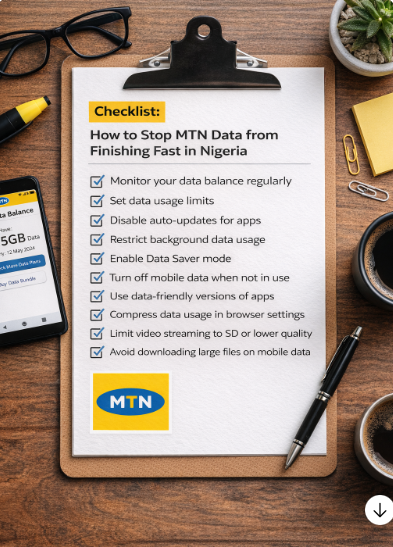
If you want immediate results, do these in order:
Turn on Data Saver (Android) / disable Background App Refresh (iPhone)
Disable auto-updates on mobile data
Set YouTube/Instagram/TikTok to data saver / low quality
Turn off Wi-Fi Assist / Smart Switch
Set WhatsApp videos to Wi-Fi only
Review top 5 data-consuming apps and restrict background data
Stop hotspot auto-use; set laptop to metered connection
Frequently Asked Questions
Why does MTN data finish so fast in Nigeria?
MTN data finishes fast in Nigeria mainly because of background app activity, automatic app and system updates, high video streaming quality, hotspot usage, and features like Wi-Fi Assist that silently switch to mobile data when Wi-Fi is unstable.
Why does my MTN data finish overnight?
MTN data often finishes overnight due to automatic app updates, WhatsApp backups, cloud syncing, and background refresh processes that run when the phone is idle, especially if mobile data is not restricted.
Does hotspot make MTN data finish faster?
Yes. Using hotspot can make MTN data finish much faster because connected devices such as laptops may download updates, sync files, or stream videos without data limits, rapidly consuming your bundle.
Can WhatsApp drain MTN data quickly?
Yes. WhatsApp can drain MTN data through auto-downloaded videos, voice notes, media files, and chat backups. Setting media downloads and backups to Wi-Fi only significantly reduces data usage.
How do I stop MTN data from draining fast on Android?
To stop MTN data from draining fast on Android, turn on Data Saver, restrict background data for heavy apps, disable auto-updates on mobile data, lower video streaming quality, and turn off smart network switching or Wi-Fi Assist.
How do I stop MTN data from draining fast on iPhone?
On iPhone, you can reduce MTN data usage by disabling Background App Refresh, turning off Wi-Fi Assist, restricting mobile data access for non-essential apps, lowering video quality on streaming apps, and stopping app updates from using mobile data.
Is MTN stealing my data?
In most cases, MTN is not stealing data. Fast data depletion is usually caused by phone settings, app behavior, streaming habits, or hotspot usage. Checking data usage by app on your phone provides a clearer picture of where the data is going.
How can I check what is using my MTN data?
You can check what is using your MTN data by viewing data usage statistics on your phone. Both Android and iPhone show a breakdown of data consumption by app, helping you identify which apps are draining your data.
Why does MTN data finish faster than other networks?
MTN data may appear to finish faster because of stronger network speed, which encourages higher-quality streaming and faster downloads. Faster speeds naturally consume more data if usage habits and settings are not controlled.
Conclusion
MTN data finishing fast in Nigeria is usually a combination of background activity, auto-updates, high-quality streaming, hotspot usage, Wi-Fi assist features, and auto-download settings—not magic deductions. The good news is that most fixes are simple and immediate: enable data saver features, lock down background data, control video quality, and stop silent downloads.
ADENIYI is a freelance writer for naijatipsland.com, blogger, social commentator, and I.T personnel. He has written many articles on Science and Technology, Education, Sports, Politics, Religion, Relationships, Entertainment, Health and more. When he is not busy researching online, he probably reads some good books, all in the quest for knowledge and information.