

Last updated: 13 October 2026. The Federal Road Safety Corps (FRSC) sets licence fees and procedures, and individual centres can work differently, so confirm details on the official portal and with your Drivers Licence Centre before you pay.
Renewing your driver’s licence at a glance
- Where: the official FRSC licence portal at nigeriadriverslicence.frsc.gov.ng. Choose DL Application, then Renewal.
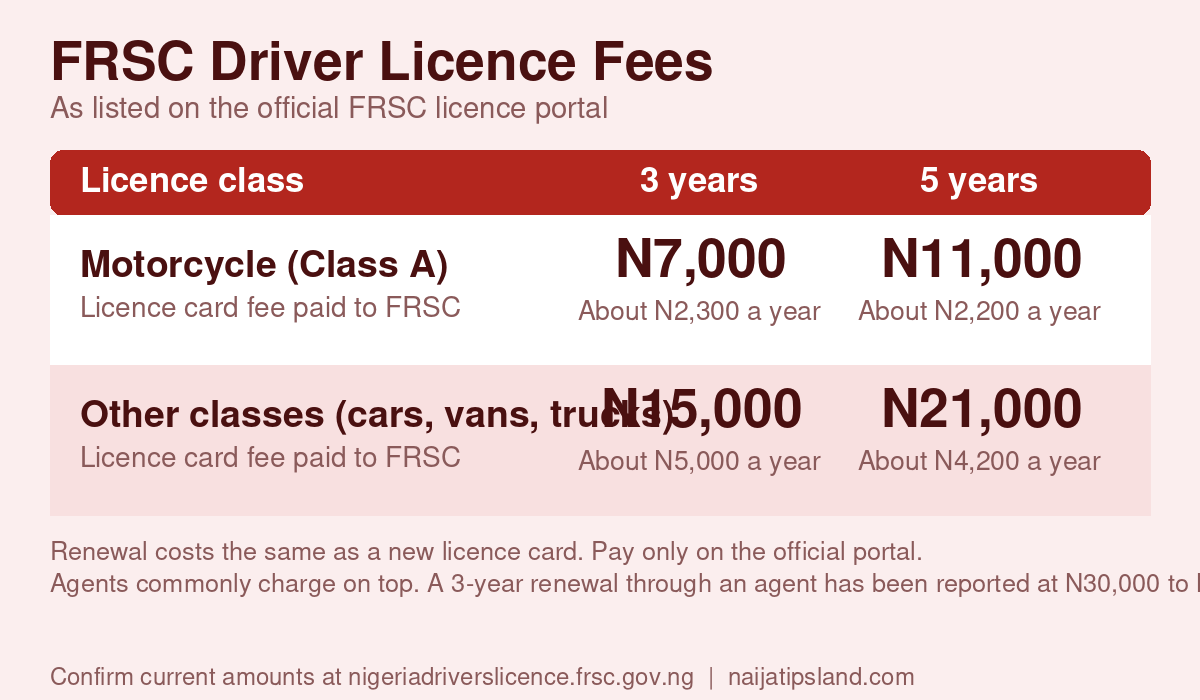
- Fees listed on the FRSC portal: ₦7,000 (3 years) or ₦11,000 (5 years) for a Class A motorcycle licence, and ₦15,000 (3 years) or ₦21,000 (5 years) for other classes.
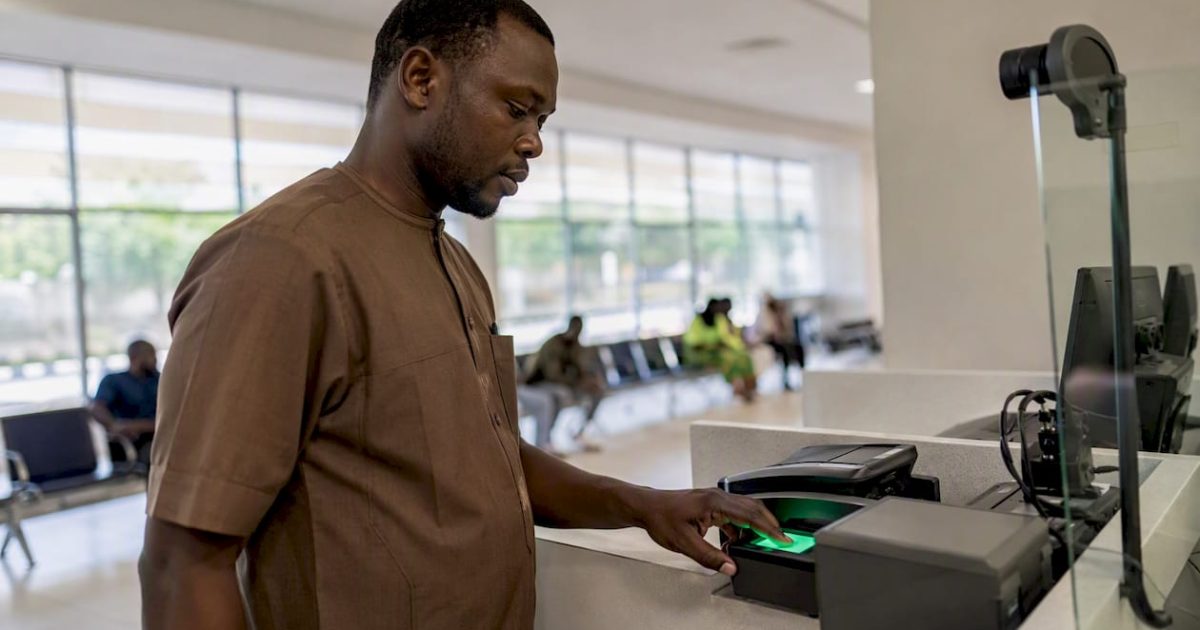
- You still have to attend: biometric capture at a Drivers Licence Centre (DLC).
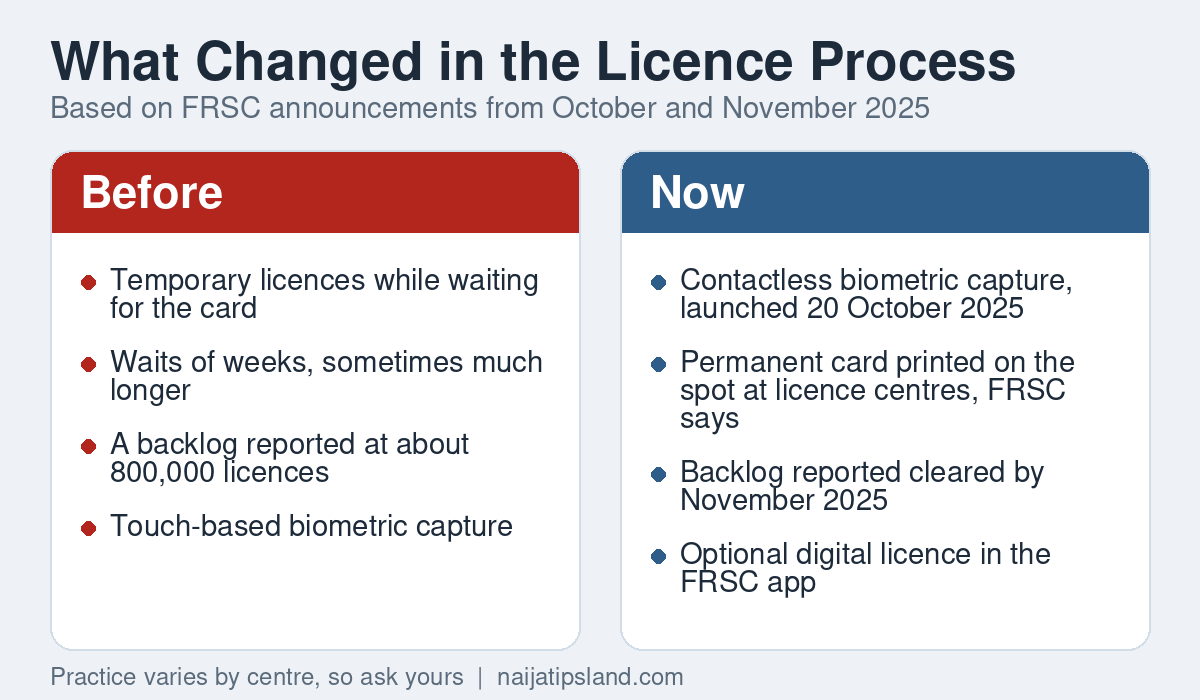
- What changed: in October 2025 the FRSC launched contactless biometric capture and said permanent licences would be printed on the spot, ending temporary licences.
- Beware: pay only on the official portal and avoid anyone who offers to skip the process for a fee.
A valid driver’s licence is compulsory for anyone driving on Nigerian roads, and an expired one can bring fines, vehicle impoundment and complications at FRSC checkpoints. The good news is that renewal is mostly online, it costs the same as a new licence card, and the FRSC says the long waits for permanent cards have been addressed. This guide explains the current fees, how renewal works step by step, what changed in 2025, and how to handle expired, lost or damaged licences.
FRSC Driver’s Licence Fees in 2026
The FRSC publishes licence fees in the questions and answers on its portal. For a licence card, the figures are:
- Class A (motorcycle): ₦7,000 for three years, or ₦11,000 for five years.
- Other classes: ₦15,000 for three years, or ₦21,000 for five years.
These replaced older fees of about ₦6,350 and ₦10,350 that many websites still quote, and the revised figures date from 2025. Renewing costs the same as a new card, because it is the same document. Driving school fees, the learner’s permit and test charges apply only to new applicants. Pay through the portal’s payment system and keep the receipt.
Three years or five years?
The five-year licence costs more up front but works out cheaper per year. For a car licence, ₦15,000 over three years is ₦5,000 a year, while ₦21,000 over five years is ₦4,200 a year. For a motorcycle licence the figures are about ₦2,300 and ₦2,200 a year. Pick five years if you drive regularly and do not mind paying more now, and remember that every renewal means another biometric visit.
What Changed in the Licence Process in 2025
For years, applicants complained about months of waiting for permanent cards while driving on temporary licences, and officials admitted to a backlog that at its peak reached about 800,000 unprocessed licences. In October 2025 the FRSC launched a contactless biometric capture system linked to the National Identification Number (NIN) database. The Corps said it would let applicants receive a permanent card at the centre, with no temporary licence and no long wait, and that it had upgraded its printing capacity. In November 2025 the Presidential Enabling Business Environment Council commended the FRSC for clearing the backlog and expanding daily production.
In practice, some centres and many websites still describe temporary licences and waits of several weeks, so ask your DLC what to expect on the day. The FRSC also announced an optional electronic driver’s licence in its mobile app, which can supplement the physical card.
How to Renew Your Driver’s Licence Step by Step
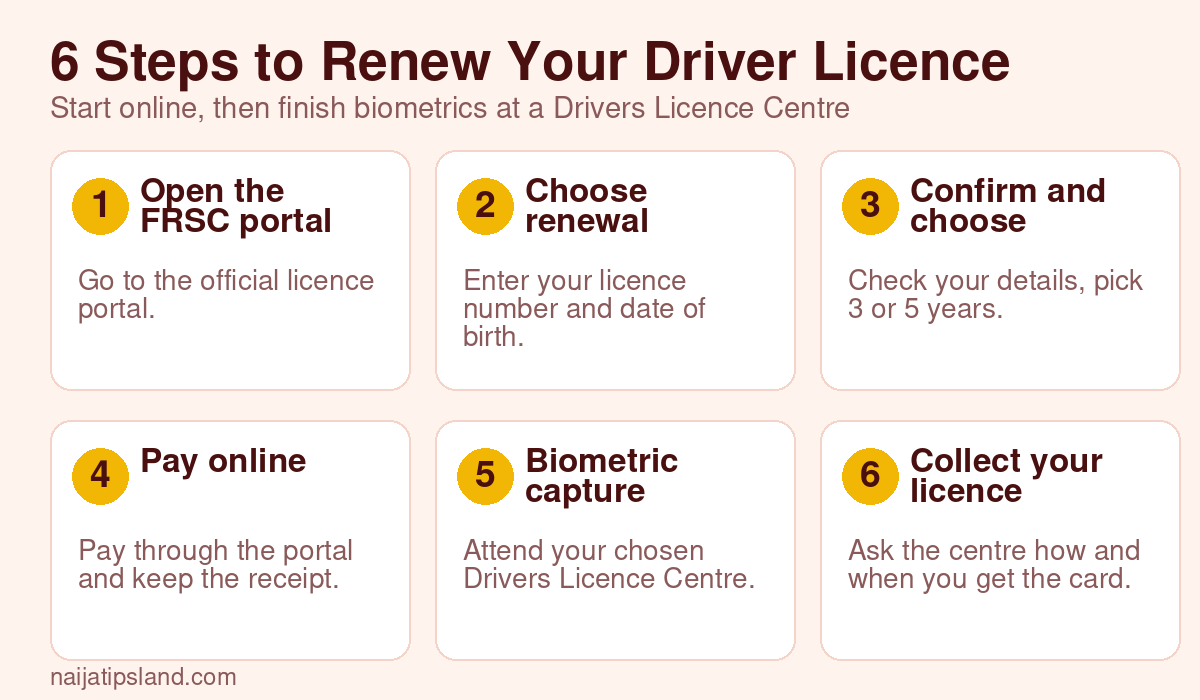
- Open the official FRSC licence portal (nigeriadriverslicence.frsc.gov.ng) in your browser. Type the address yourself rather than following links from messages or adverts.
- Select DL Application, then Renewal of Driver’s Licence. Enter your existing licence number and your date of birth. The portal retrieves your record and pre-fills most of the form.
- Confirm your details and choose the validity. Check that your name, date of birth and other details are correct and match your NIN, then pick three or five years.
- Pay through the portal. Use the official payment option and save the receipt and your application reference.
- Attend biometric capture. Choose a Drivers Licence Centre and an appointment, and go with your documents. Your photograph and fingerprints are captured on site.
- Collect your licence. Ask the centre whether your permanent card is issued immediately or whether you will receive a temporary licence while it is produced.
What You Need to Renew
- Your current or expired driver’s licence number and date of birth.
- A valid NIN that is linked to your details. If it does not match, correct it first. Our guide on how to verify your NIN explains how.
- Access to online payment and a way to receive notifications.
- Valid identification and your payment receipt for the biometric appointment.
Some applicants are asked to take a short assessment at the Vehicle Inspection Office (VIO), with a fee of about ₦2,200 reported. Requirements can vary, so check what the portal and your centre ask for.
Expired, Lost, Stolen or Damaged Licences
- Expired licence: renew as soon as you notice, using the same process and fees. Driving on an expired licence can lead to penalties at checkpoints.
- Lost or stolen licence: report the loss and apply through the portal for a replacement. Keep your application reference and any report you were given.
- Damaged licence: apply for a replacement or renewal and bring the damaged card to your appointment if you still have it.
- Carry the original: at an FRSC checkpoint you should show your original licence or a valid temporary licence, not just a photocopy.
If You Are Applying for the First Time
A first licence has more steps than a renewal. According to the FRSC’s guidance, a fresh applicant completes the mandatory training at an accredited driving school and gets a certificate number. You then enter that number on the portal under New Driver’s Licence Application. After that you complete the remaining steps, which typically include the learner’s permit, tests and biometric capture. Driving school fees are separate and vary between schools.
Avoiding Agents and Fake Websites
Delays create a market for touts and look-alike websites. Agents do exist, and a three-year renewal through one has been reported at roughly ₦30,000 to ₦55,000 including the official fee, but you do not need one. Pay only through the official portal, never hand your NIN and licence details to strangers, and treat promises of a guaranteed date with suspicion. Our guides to avoiding internet scams and common WhatsApp scams show the usual tricks.
Fixing Common Problems
- The portal will not find your licence: check the licence number and date of birth, try again later, or ask your DLC to confirm the record.
- Payment went through but the portal does not show it: keep your receipt and reference, wait for confirmation, then contact the FRSC through its official channels. Do not pay a second time outside the portal.
- NIN mismatch: correct your NIN record at NIMC before your appointment. See our passport guide for how mismatches cause delays with another government service.
- Long queues: choose an appointment time and centre carefully, and arrive early.
Why Keeping Your Licence Valid Matters
A valid licence is not only a legal requirement. It is also the document insurers, employers, car-hire companies and ride-hailing platforms usually ask for, and it is increasingly checked against national records, because the FRSC’s new system is tied to the NIN database. Letting it lapse can mean fines, delays at checkpoints and, in some cases, trouble with an insurance claim after an accident. Set a reminder at least two months before the expiry date printed on your card so you have time to fix any NIN or record problems.
Tips for a Smooth Renewal Day
- Book early. Pick the earliest appointment you can attend, because popular centres fill up.
- Arrive prepared. Bring your licence number, your NIN details, valid ID, your payment receipt and your application reference, in both printed and phone form.
- Charge your phone. You may need it to show your receipt, receive messages or open the portal.
- Follow the official process. Pay through the portal, not to individuals at the centre, and ask for a receipt for anything you pay.
- Check the card before you leave. Confirm that your name, date of birth, class and expiry date are correct. Errors are far easier to fix at the centre than weeks later.
- Keep a digital copy. Photograph the card and store your receipt and reference number somewhere safe in case you need to replace it.
Frequently Asked Questions
How much does it cost to renew a driver’s licence in Nigeria?
According to the FRSC portal, ₦15,000 for three years or ₦21,000 for five years for most classes, and ₦7,000 or ₦11,000 for a motorcycle licence. Renewal costs the same as a new card.
Can I renew my driver’s licence entirely online?
You start and pay online, but you still need to attend a Drivers Licence Centre for biometric capture.
How long does renewal take?
Reports in 2026 range from same-day permanent cards, which the FRSC says its new system allows, to a few weeks. Ask your centre what to expect.
Is there still a temporary licence?
The FRSC says temporary licences are being phased out, but some centres and guides still mention them. Confirm on the day.
What if my licence has expired?
Renew it through the same process. Do not drive on an expired licence while you wait.
Do I need a NIN to renew my licence?
Yes. The FRSC’s new system is linked to the NIN database, so your NIN should be valid and correct.
Related Guides
- How to verify your NIN in Nigeria
- Nigerian passport application: fees, steps and timeline
- How to avoid internet scams
Sources
- FRSC National Driver’s Licence portal: frequently asked questions
- Vanguard: Driving licence will be seamless now, FRSC
- Voice of Nigeria: FRSC clears licence backlog, boosts production to 15,000 daily
- 234Drive: FRSC’s contactless biometric driver’s licence
- BrandArena: FRSC launches digital driver’s licence system
- Fenix Telematics: Driver’s licence renewal in Nigeria, cost, steps and timeline
- WithinNigeria: Vehicle licence renewal in Nigeria 2026
Join the discussion
Have you tried this, or do you have a question we did not answer? Be the first to share your experience. Naijatipsland members help each other with real, first-hand experience.