


TL;DR:
- NIN verification in Nigeria confirms whether your 11-digit number is active and properly synchronized in the central database.
- The process involves methods like USSD code *346#, the NIMC Mobile ID app, or in-person visits to NIMC centers, all requiring specific preparations.
NIN verification is the process of confirming that your 11-digit National Identification Number (NIN) is active, accurate, and properly synchronized in Nigeria’s National Identity Management Commission (NIMC) central database. Knowing how to verify NIN is not optional for most Nigerians today. Banks, telecom providers, the Nigerian Immigration Service, and federal agencies all require a validated NIN before processing your requests. You can complete the NIN verification process using three approved methods: the USSD code *346#, the NIMC Mobile ID app, or an in-person visit to an NIMC enrollment center. This guide walks you through each method clearly, including what to prepare, what can go wrong, and how to fix it.
What you need before verifying your NIN
Preparation prevents most verification failures. Gather the following before you begin any method.
- Registered SIM card: The SIM card used for USSD retrieval must be the one linked to your NIN during NIMC enrollment. Using a different SIM causes retrieval to fail immediately.
- Mobile phone: A basic phone works for the USSD method. A smartphone with internet access is required for the NIMC Mobile ID app method.
- Airtime balance: The USSD service costs ₦20 per query, deducted by your network provider. NIMC itself does not charge for NIN retrieval.
- Internet connection: The NIMC Mobile ID app and the Immigration portal both require a stable data connection.
- Valid identification documents: If you visit an NIMC enrollment center in person, bring your original birth certificate, international passport, driver’s license, or voter’s card.
- Date of birth: The Immigration portal requires your NIN and date of birth to run a validation check.
Pro Tip: Check that your registered SIM card is active and has at least ₦20 airtime before you dial. A failed USSD attempt still deducts the charge on some networks.
Missing any of these items adds delays. Confirm each one before you start.
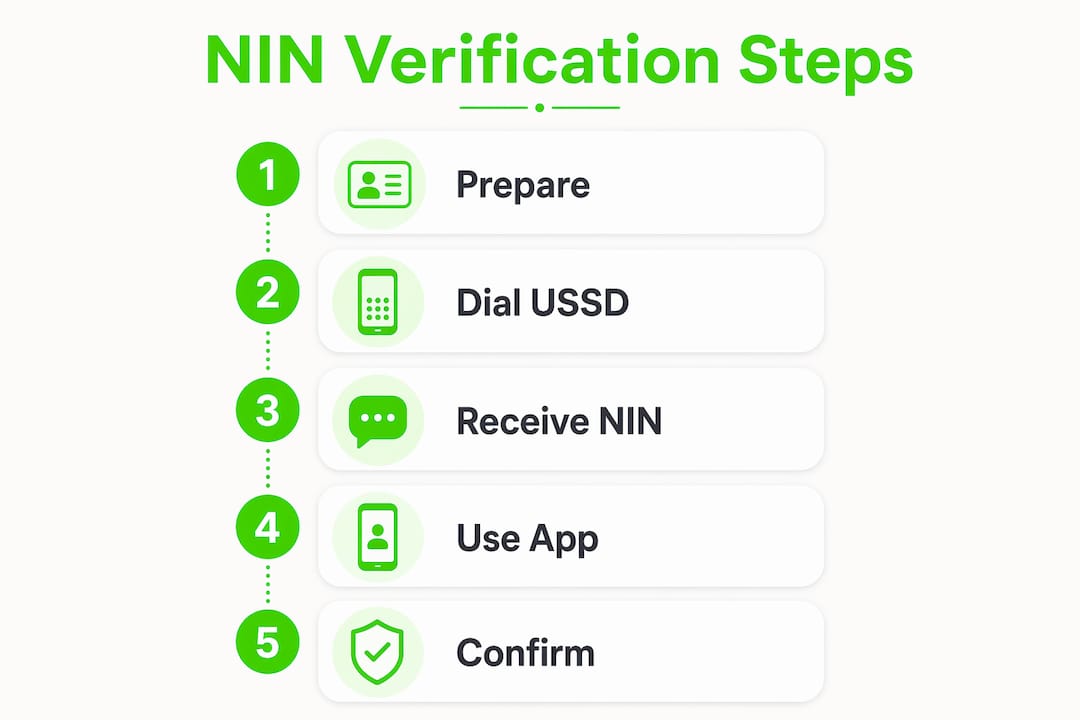
How to verify your NIN using the USSD code *346#
The USSD method is the fastest offline option for NIN retrieval. It works across MTN, Glo, 9mobile, and Airtel networks and completes in under 2 minutes. Follow these steps exactly.
- Insert your registered SIM card into your phone. Confirm it is the SIM you used during NIMC enrollment.
- *Dial 346# from that SIM. Your phone will display a menu within seconds.
- Select the NIN retrieval option from the menu. The exact option label varies slightly by network, but it is always listed as NIN retrieval or “Check NIN.”
- Acknowledge the service charge. The network deducts ₦20 from your airtime at this step.
- Read your NIN on screen. Your 11-digit NIN appears on the display. Write it down immediately.
- End the session. The code closes automatically after displaying your NIN.
Two security facts matter here. First, USSD responses display on screen only and are never sent by SMS. That protects your NIN from being intercepted in your message inbox. Second, the network provider does not save your NIN after the session ends, so you must record it before closing.
Pro Tip: Write your NIN in a secure, private location immediately after it appears. Do not screenshot it and store the image in an unsecured photo gallery.

Common USSD errors and what they mean
A “record not found” message means the SIM you used is not linked to your NIN in the NIMC database. This is not a retrieval error on the network side. It means your enrollment record is either incomplete or linked to a different phone number. Visit your nearest NIMC enrollment center with valid ID to resolve this. If you lost the SIM card registered during enrollment, formal intervention at an NIMC center with valid identification is the only resolution path.
How to use the NIMC Mobile ID app to confirm NIN details
The NIMC Mobile ID app is the most secure and versatile verification method when you have a smartphone and internet access. It also lets you generate a Virtual NIN (vNIN), which is a 16-digit token you share with agencies instead of your actual NIN. Follow these steps.
- Download the NIMC Mobile ID app from Google Play Store (Android) or Apple App Store (iOS). Search for “NIMC Mobile ID” and install the official app published by NIMC.
- Open the app and select “Register.” Enter your 11-digit NIN and your registered phone number.
- Enter the OTP. NIMC sends a one-time password to your registered phone number. Type it into the app to verify your identity.
- Access your NIN profile. The app displays your full name, photograph, date of birth, and other biometric details stored in the NIMC database.
- Generate a Virtual NIN. Tap the vNIN option. The app produces a 16-digit token valid for a limited period. Share this token with banks, telecom providers, or government agencies instead of your actual NIN.
- Log out after each session. This prevents unauthorized access if your phone is lost or stolen.
The app method gives you more than just your NIN number. It confirms that your biometric data, photograph, and personal details are correctly stored. That level of detail is not available through the USSD method.
Pro Tip: Always generate and share your Virtual NIN token instead of your actual NIN when agencies request identity confirmation. This protects you against identity theft.
Troubleshooting app registration issues
If the app rejects your NIN during registration, confirm that the phone number you entered matches the one linked to your NIN during enrollment. A mismatch here is the most common cause of app registration failure. If your registered number is no longer active, visit an NIMC enrollment center to update your phone number before attempting app registration again.
How to verify your NIN status on the Immigration portal
The Nigerian Immigration Service portal at passport.immigration.gov.ng offers a direct check of your NIN validation status for travel documents and official applications. This method confirms whether your NIN is properly synchronized with the central database that immigration and other agencies access.
- Open a browser and go to passport.immigration.gov.ng.
- Locate the NIN verification section on the portal’s homepage or under the “Services” menu.
- Enter your 11-digit NIN and your date of birth in the fields provided.
- Complete the CAPTCHA to confirm you are not a bot.
- Submit the form. The portal processes your request and returns a result within seconds.
- Read the result carefully. A successful validation displays your full name, photograph, and registration details. A “not validated” result means your NIN exists in the local NIMC database but has not synced to the central clearinghouse.
The distinction between retrieval and validation is critical. NIN retrieval via USSD or app does not guarantee validation. Validation confirms that your record is active and accessible to agencies like immigration and banks. You can retrieve your NIN successfully and still fail a validation check on the Immigration portal.
What to do if your NIN verification fails or shows “not validated”
A failed NIN verification is fixable. Understanding the cause determines the right solution.
- Data not synced to central database: NIN verification errors often occur because a record exists locally at NIMC but has not been pushed to the central clearinghouse accessed by agencies. This is the most common cause of “NIN not validated” errors.
- Mismatched phone number or SIM: Many verification failures stem from users trying to verify NINs with mismatched phone numbers or unlinked SIM cards. Confirm your registered number before attempting any method.
- Incomplete enrollment: If your biometric capture was interrupted during enrollment, your record may be flagged as incomplete. Only an NIMC enrollment center can resolve this.
- Wrong date of birth entered: The Immigration portal is strict about date of birth format. Enter it exactly as it appears on your enrollment documents.
Pro Tip: Request a data harmonization or synchronization at your nearest NIMC enrollment center if the Immigration portal returns “not validated.” Bring your original NIN slip, a valid government-issued ID, and your registered SIM card.
What happens at the NIMC enrollment center
A manual data synchronization request at an NIMC enrollment center triggers an update that reflects in the central database within 24–48 hours. Bring your original NIN slip, a valid government-issued ID such as a driver’s license or voter’s card, and the SIM card registered to your NIN. The NIMC officer will review your record, correct any data mismatches, and submit a synchronization request. Check the Immigration portal again after 48 hours to confirm the update. For broader guidance on navigating Nigerian registration processes, the NIN registration guide on Naijatipsland covers common enrollment challenges in detail. If your NIN is validated and you are preparing a passport application, confirmed NIN status directly affects your passport application process at the Immigration Service.
Key Takeaways
Successful NIN verification requires using the correct SIM card, choosing the right method for your situation, and understanding that retrieval and validation are two separate outcomes.
| Point | Details |
|---|---|
| Use your registered SIM | Only the SIM linked during NIMC enrollment works for USSD retrieval and app registration. |
| Retrieval is not validation | Retrieving your NIN via USSD or app does not confirm it is synced to the central database. |
| App method is most complete | The NIMC Mobile ID app shows biometric details and lets you generate a secure Virtual NIN token. |
| Immigration portal confirms sync status | Use passport.immigration.gov.ng with your NIN and date of birth to check true validation status. |
| NIMC centers fix sync failures | A manual data harmonization request resolves “not validated” errors within 24–48 hours. |
Naijatipsland’s take on NIN verification in Nigeria
The biggest mistake Nigerians make with NIN verification is treating retrieval and validation as the same thing. They are not. Retrieving your NIN means you accessed your number. Validation means the central system that banks, immigration, and telecoms query actually recognizes your record. You can have one without the other, and that gap causes real problems at critical moments like passport renewals or SIM re-registration.
My second observation is about security. Most people share their actual NIN freely, treating it like a phone number. That is a mistake. The Virtual NIN feature in the NIMC Mobile ID app exists precisely because your actual NIN should stay private. Use the vNIN token for every agency request. If an organization insists on your actual NIN without a clear legal basis, that is a red flag worth questioning.
Patience matters more than most guides admit. Data synchronization at NIMC takes 24–48 hours after a harmonization request. Checking the portal every hour does not speed it up. Submit the request, wait the full period, then verify. Rushing the process leads to repeated visits and unnecessary frustration.
Finally, use only official channels: the NIMC Mobile ID app, the *346# USSD code, and the Immigration portal. Third-party websites that claim to verify NINs for a fee are not authorized by NIMC and pose a serious identity theft risk. Stick to the official methods described here and you will not go wrong.
— Naijatipsland
Stay informed with Naijatipsland
Naijatipsland covers the practical topics that matter most to Nigerians, from identity documentation to lifestyle and current affairs.
Whether you are managing your NIN, tracking voter registration requirements, or staying current on Nigerian news and community discussions, Naijatipsland brings it all together in one place. The platform publishes guides, news, and community discussions tailored to Nigerian readers navigating real-world processes. For a broader look at what Naijatipsland offers beyond documentation guides, check out the Nigerian lifestyle tips section for practical advice relevant to everyday life in 2026. You can also explore digital resources for Nigerians to find platforms that support your information and lifestyle needs. Visit Naijatipsland regularly to stay connected, informed, and ready for whatever official process comes next.
FAQ
What is the USSD code to check my NIN?
Dial *346# from the SIM card registered to your NIN. The process costs ₦20 and works on MTN, Glo, 9mobile, and Airtel networks.
What is the difference between NIN retrieval and NIN validation?
NIN retrieval means accessing your 11-digit number via USSD or the NIMC app. NIN validation confirms your record is synced to the central database that agencies like immigration and banks query.
Why does the Immigration portal show my NIN as “not validated”?
Your NIN exists in NIMC’s local database but has not synced to the central clearinghouse. Visit an NIMC enrollment center to request a data harmonization, which resolves the issue within 24–48 hours.
Is it safe to share my NIN with organizations?
Keep your actual NIN private and share only your Virtual NIN (vNIN) token generated through the NIMC Mobile ID app. Security experts recommend the vNIN to protect against identity theft.
What documents do I need to visit an NIMC enrollment center?
Bring your original NIN slip, a valid government-issued ID such as a driver’s license, voter’s card, or international passport, and the SIM card registered to your NIN.