


Last updated: 16 October 2026 · By Naijatipsland Editorial Team · Editorial policy
You tap your card at a POS terminal, enter your PIN, and the screen says “transaction failed” or “unable to process”. Then your phone buzzes with a debit alert. Either the money has been taken and you got no cash or goods, or you cannot tell if the payment went through. This happens often in Nigeria, and the first hours matter. This guide explains what to do straight away, how long the Central Bank of Nigeria (CBN) says banks have to reverse the money, what evidence to keep, how to complain and escalate, and mistakes to avoid. It is general information, not legal advice, and bank processes differ.
If you want to avoid POS agent scams in the first place, read our guide to avoiding POS agent fraud.
The short answer
- Do not panic and do not pay twice. Many failed POS debits reverse automatically.
- Keep the evidence: the receipt or screen, the debit alert, the agent’s details and the time.
- CBN guidelines say refunds on failed or disputed POS and web transactions should be treated within 48 hours. If the money has not come back by then, contact your bank.
- Complain to your bank, not just the agent. If it is not resolved after about two weeks, you can escalate to the CBN’s Consumer Protection Department.
- Never give anyone your PIN or OTP to “fix” it.
What to do in the first few minutes
- Do not walk away yet. Ask the agent or merchant to print or show the terminal’s slip, even if it says declined, and take a photo of the screen.
- Check your balance and the alert in your banking app. Is there a debit? What is the exact amount, time and description?
- Do not try again immediately with the same card. A second attempt can lead to a double debit.
- Take down the details: the agent’s name and phone number, the shop location, the terminal ID on the slip, the amount, the time and the date.
- Screenshot the alert and, later, your account statement.
- Do not give your PIN, OTP or card to anyone to “help”. Keep your card safe, and if you suspect your card was compromised, see our guide on blocking your ATM card.
How long should a refund take?
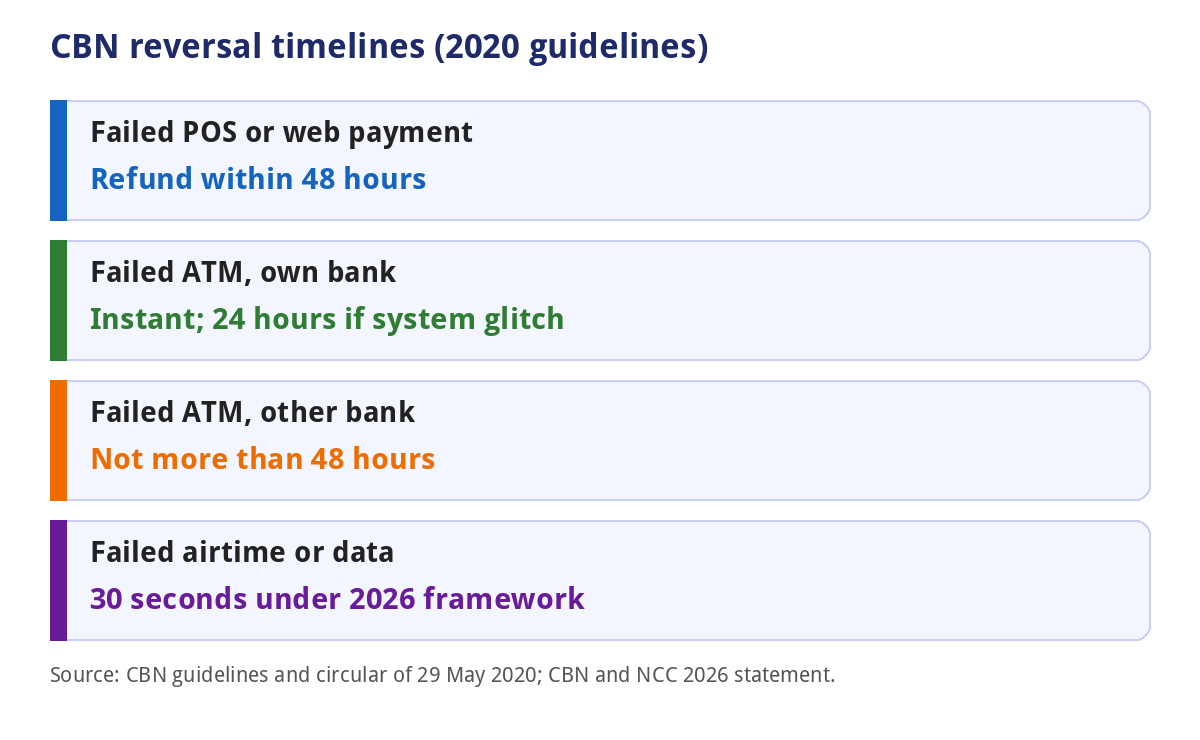
The CBN’s Guidelines on the Operations of Electronic Payment Channels in Nigeria 2020 set these timelines:
- Failed or disputed POS and web transactions: refunds should be treated within 48 hours.
- POS errors reported to the bank: the bank must investigate and resolve the claim within 48 hours.
- Merchant and cardholder disputes: to be resolved within 48 hours.
- Chargeback cycle for switches: reduced from 72 hours to 24 hours.
- Failed ATM withdrawals: instant reversal at your own bank’s ATM (24 hours if there is a system problem), and not more than 48 hours at another bank’s ATM.
These followed a CBN circular of 29 May 2020, effective 8 June 2020, which cut the old refund period for POS and web transactions from five days to 48 hours, according to Mondaq and Ripples Nigeria. The CBN and the Nigerian Communications Commission also announced a framework, due to take effect on 1 March 2026 subject to approvals, for refunds within 30 seconds for failed airtime and data purchases. TechCabal’s report on it does not mention POS or transfers, so it does not change the POS rules.
The 48 hours is a target the CBN sets for banks and processors. The money may take longer to show in practice, and weekends and holidays can affect it. Do not wait for weeks.
Step by step: how to get your money back

- Wait for the automatic reversal, and check your balance after 48 hours. Many failed transactions reverse by themselves.
- If the money is still missing, contact your bank through its official app, customer care line or branch. Report it as a failed POS transaction with a debit, and give the date, time, amount, terminal ID and the agent’s details.
- Ask for a complaint reference number and the expected resolution date. Write down the name of the person you spoke to.
- Put it in writing. Use the bank’s email or in-app complaint option, and attach your evidence. A written complaint creates a record.
- Chase after the deadline. The CBN guidelines expect a POS claim to be resolved within 48 hours of your report, so follow up if you hear nothing.
- Escalate after about two weeks. The CBN’s guide to lodging complaints says to complain to your bank first and allow around two weeks, then send your complaint to the Consumer Protection Department by email to cpd@cbn.gov.ng or by letter to the Director, Consumer Protection Department in Abuja. Include your details, the transaction history, the amount, your supporting documents and proof that you complained to the bank first. Never include your PIN or passwords.
- Consider legal action as a last resort. Tribune reported in 2022 that an Akwa Ibom High Court ordered Polaris Bank to pay N500,000 in damages to a customer whose N61,000 POS debit was reversed only after 28 days. That was one case, and the result of any claim depends on the facts. Speak to a lawyer for advice.
The evidence to keep
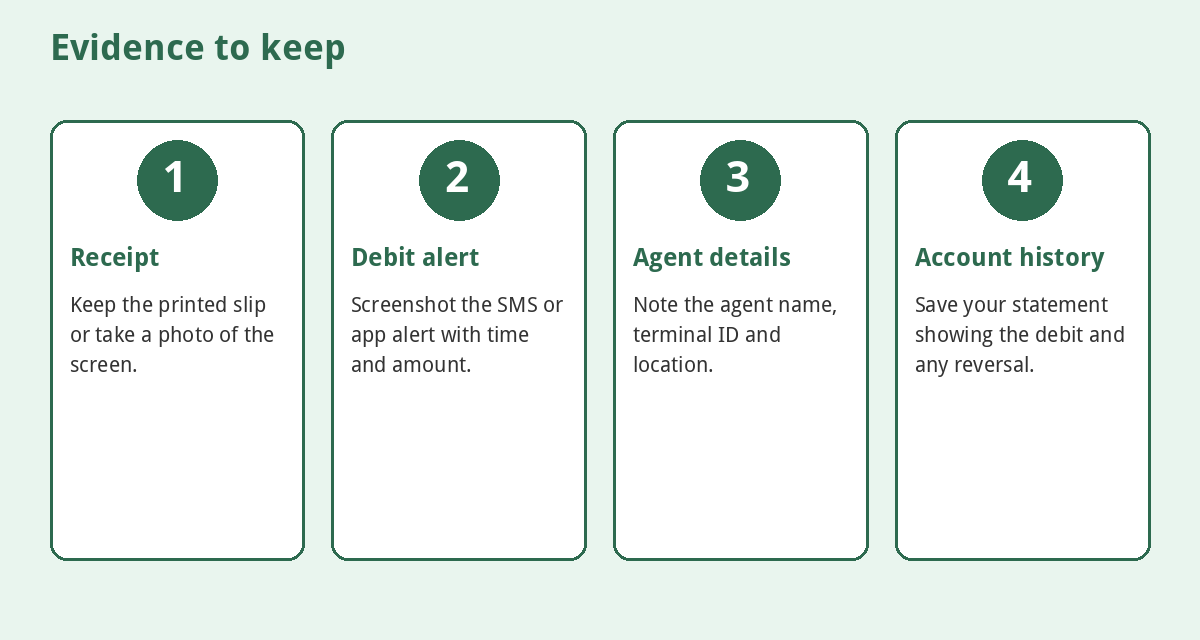
- The terminal slip or a photo of the screen.
- The debit alert and your account statement showing the amount, time and description.
- The agent’s name, phone number and shop location, and the terminal ID.
- Any messages with the agent or the bank, and your complaint reference.
- Proof of the date and time, such as a screenshot of your app.
The CBN guidelines tell cardholders to keep a receipt or other evidence of each transaction. Without it, a dispute is much harder.
Who is responsible: the agent, the bank or you?
The POS terminal usually belongs to a payment terminal service provider (PTSP) or a bank, and an agent only operates it. The agent cannot reverse a debit from your account, so asking the agent to “refund” you is not a substitute for a bank complaint. A merchant must supply evidence quickly in a dispute, and under the CBN guidelines merchants are liable for card fraud caused by their negligence or connivance. A cardholder, on the other hand, is held liable for fraud arising from the misuse of their PIN or card, so keep your PIN private.
The guidelines also say the POS must show the amount on the screen requesting your PIN. Always check it before you enter the PIN.
Is it a failed transaction or a scam?
- Debited but no cash: report it to your bank straight away as a failed POS transaction.
- You paid by transfer to the agent and got no cash: that is not a POS failure. See our guide to recovering money sent to the wrong account.
- Someone asks for your OTP or PIN “to reverse”: it is a scam. See fake alerts and phishing messages.
- Debits you did not make: block the card, tell your bank and report it. Our guide on how to report cybercrime shows how.
- Multiple debits: screenshot each one and list them in your complaint.
Also check the charge on your slip against what you expected. See our guide to bank transfer charges for typical fees.
Tips to avoid the problem
- Use bank ATMs or branch POS where you can, especially for large amounts.
- Check the amount on the screen before you enter your PIN.
- Cover the keypad and never let anyone see your PIN.
- Keep your bank app notifications on.
- Do not use agents who insist on taking your card away from you.
- Keep a small cushion in the account so that you are not stranded if a debit is delayed.
Common mistakes
- Leaving the shop without a slip or a photo.
- Trying again several times.
- Waiting for the agent to “sort it out” and not contacting your bank.
- Giving a PIN or OTP to anyone claiming to reverse the transaction.
- Relying on phone calls and not getting a reference number.
- Letting weeks pass before complaining.
- Not checking your statement for the reversal.
Frequently asked questions
How long does a failed POS transaction take to reverse?
The CBN guidelines say refunds on failed or disputed POS transactions should be treated within 48 hours. Check your account after that.
What if the money does not return after 48 hours?
Contact your bank, get a reference number, put the complaint in writing and keep following up.
Can the POS agent refund me?
The agent cannot reverse a debit from your bank account. The reversal comes through the bank and the payment processors.
Who do I escalate to?
After your bank fails to resolve it, usually about two weeks, you can write to the CBN’s Consumer Protection Department.
Should I do the transaction again?
Not until you have checked your balance and the status of the first one. A repeat can mean a double debit.
Is the bank liable if I lose money from a failed transaction?
The CBN guidelines expect banks to reverse failed transactions within the stated times. Whether you can claim damages depends on the facts, so ask a lawyer.
Do these rules cover transfers?
They cover POS, web and ATM transactions. Transfer disputes follow different bank procedures. See our guide on wrong-account transfers.
Bottom line
Keep your evidence, check your balance after 48 hours, and if the money has not returned, complain to your bank in writing and get a reference number. Escalate to the CBN if the bank does not resolve it after around two weeks. Never let anyone have your PIN or OTP in the name of a refund.
Sources
- Central Bank of Nigeria: Guidelines on the Operations of Electronic Payment Channels in Nigeria (2020)
- Mondaq: Chargeback period reduction for ATMs, POS and web transactions (2020)
- Ripples Nigeria: CBN reduces processing time for reversal of failed ATM, POS and web transactions (1 Jun 2020)
- Central Bank of Nigeria: How to lodge a complaint
- Tribune Online: Customer urges banking public to seek redress for failed POS transactions (27 Jun 2022)
- TechCabal: Why failed airtime top-ups in Nigeria will now be refunded in 30 seconds (Jan 2026)









The CBN expects POS failures to be resolved within 48 hours of your report, but in practice it often takes longer. If you’ve been debited without getting cash, how long did your bank take to reverse it?
The agent can’t reverse a debit from your account, so asking them for a refund is no substitute for a bank complaint. Do you always ask for a slip before leaving a POS stand?
CBN guidelines say refunds on failed or disputed POS and web transactions should be treated within 48 hours. How long did yours take when it happened to you?
Ask the agent to print or show the terminal slip, even if it says declined, and photograph it. Complain to your bank, not just the agent. Have you ever had to escalate a failed POS debit?