
How to Get Nigerian Blog Posts Indexed on Google (2026): Fix Pages Google Is Not Indexing

Last updated: 6 November 2026 · By Naijatipsland Editorial Team · Editorial policy
You hit publish, wait a day, search for your post title on Google and nothing appears. For many new Nigerian bloggers this is the most frustrating part of blogging, and it usually has a clear cause. This guide explains how Google decides what to index, how to ask it to index a new post, and how to diagnose the real reason when Google says a page is “not indexed”. It is based on Google’s own Search Central and Search Console help pages, which we read on 6 November 2026, together with the settings you will find in WordPress and Rank Math.
Short version: make sure the page is public and not blocked, submit the URL in Search Console, submit your sitemap, link to the post from other pages on your site, and make the content worth storing. Then wait. Google says crawling can take from a few days to a few weeks, and asking repeatedly does not speed it up.
Crawled, indexed and ranking are three different things
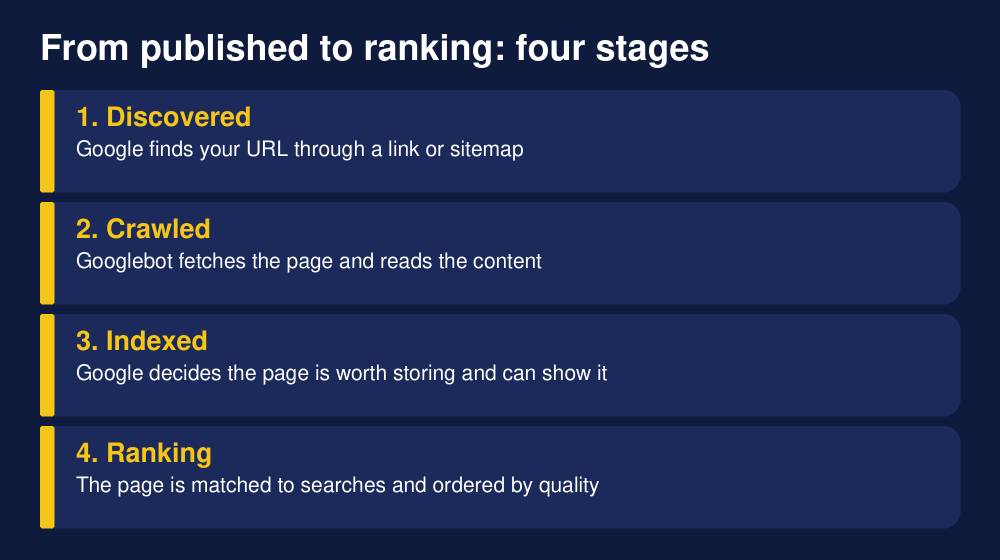
Many bloggers use “indexed” to mean “I can find it on Google”. In practice Google moves a page through stages. First it discovers the URL, usually by following a link or reading a sitemap. Then Googlebot crawls it, which means it fetches the page and reads what is on it. Only after that does Google decide whether to add the page to its index, the database it searches when someone types a query. A page can be indexed and still sit on page ten for the keywords you hoped for, so “indexed” is the first hurdle, not the finish line.
Google also says a crawl or an index request is not a promise. Even a correct page can be left out if Google decides it adds little value for searchers. That is why the fix is rarely a trick and usually a mix of technical checks and better content.
Step 1: Check whether the page is really indexed
Do not rely on the old habit of typing the URL into Google. The reliable way is Google Search Console, the free tool where you prove you own your site. If you have not set it up, add your site as a Domain property or a URL prefix property and verify it. Rank Math and Site Kit both have connection options inside WordPress, or you can add the DNS record your domain registrar provides.
Then open the URL Inspection tool at the top of Search Console, paste the full address of your post and press enter. You will see one of three broad answers:
- URL is on Google: the page is indexed. If it still does not show for a search, the issue is ranking, not indexing.
- URL is not on Google: read the reason shown, such as “Discovered – currently not indexed” or “Excluded by noindex tag”. The rest of this guide explains each one.
- Unknown to Google: Google has not found the URL yet. Submit a sitemap and add internal links.
You can also type site:yourdomain.com/your-post-slug into Google as a quick sanity check, but treat it as a rough signal and trust Search Console for the real status.
Step 2: Request indexing for a new post
For one or a few pages, Google recommends the URL Inspection tool. Inspect the address, wait for the live check, and if the page is eligible choose Request Indexing. Google notes that only site owners and full users of the property can do this, that there is a quota for individual submissions, and that requesting a recrawl of the same URL many times will not get it crawled any faster. So submit once, then do the other steps below rather than clicking the button every hour.
For many pages, or for a brand new site, Google recommends a sitemap instead. Google describes a sitemap submission as a hint, not a command, but it is the standard way to tell Google about all the URLs you care about. Hosted platforms such as WordPress.com often submit new content automatically, but on a self-hosted WordPress site you should check this yourself.
Step 3: Set up your sitemap properly
A sitemap is a file that lists your important URLs. Google accepts XML, RSS or Atom feeds and plain text lists. An XML sitemap can contain up to 50,000 URLs or 50MB uncompressed, and larger sites split theirs into several files under a sitemap index. Google also says it uses the lastmod date only when it is consistently accurate, and that it ignores the priority and changefreq fields, so do not waste time tuning those.
If you use Rank Math, your sitemap is normally at yourdomain.com/sitemap_index.xml. In WordPress go to Rank Math, then Sitemap Settings, and make sure the sitemap is on and that posts and pages are included. Do not include thin sections you do not want indexed, such as tag archives with a single post, author pages for a one-person blog, or attachment pages. In Search Console open Sitemaps, paste sitemap_index.xml and submit. You can also add a line Sitemap: https://yourdomain.com/sitemap_index.xml to your robots.txt so every crawler can find it. If you are still setting up your site, our guide to creating a WordPress website in Nigeria covers the basic install, and our list of best WordPress plugins for Nigerian news and entertainment blogs explains where an SEO plugin fits.
Why Google says “not indexed”: the statuses and what to do
The Pages report in Search Console (under Indexing) groups your URLs by status. Google’s help page describes the common ones as follows. Importantly, not every “not indexed” label is a problem. Pages that are redirects, deliberate noindex pages or correct duplicates are meant to be left out.
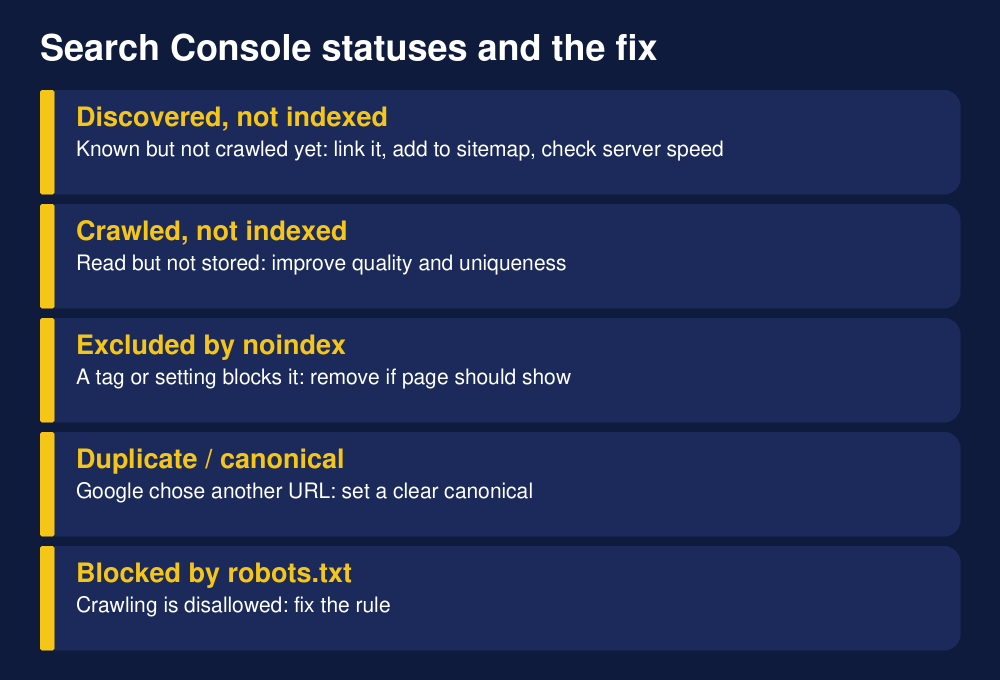
Discovered – currently not indexed
Google knows the URL exists but has not crawled it yet. Google says it likely postponed the crawl to avoid overloading your site. Usually no action is needed, but make sure the page is linked from a page Google already knows and listed in your sitemap. On slow Nigerian shared hosting, this status is more common, so check that your server responds quickly and does not return errors. Our guide to cheap but reliable hosting for Nigerian bloggers explains what to look for.
Crawled – currently not indexed
Google fetched the page but chose not to store it. Google’s own page says this is common and does not always mean something is broken. For an important page, inspect it with the URL Inspection tool and compare it with pages that do get indexed. The usual causes are content that is thin, copied or very similar to many other pages, pages with no clear purpose, and sites with a large share of low-value URLs. The fix is quality: add original information, a clear answer to the searcher’s question, helpful images and sources, and internal links from stronger pages. Merging several weak posts into one stronger guide is often better than publishing many near-identical ones.
Excluded by ‘noindex’ tag
The page carries a noindex instruction in its HTML or HTTP header, so Google leaves it out. If you want the page in search, remove the tag and confirm with a live test in URL Inspection. On WordPress the common culprits are: the setting Discourage search engines from indexing this site under Settings, then Reading, which developers often tick on a staging site and forget to untick at launch; a Rank Math or other SEO plugin setting that sets a post type, category or single post to noindex (check the Advanced tab in the Rank Math box below the editor); and a caching or maintenance plugin that adds a noindex header. If you are checking an old site that has been through a redesign, open the page source and search for “noindex”.
Blocked by robots.txt
A robots.txt rule tells Googlebot not to crawl the page. Google says a blocked URL can still appear in the index without its content if other pages link to it. If the page should be public, remove the rule. If it should stay out of search, Google recommends removing the robots.txt block and using a noindex directive instead, because Google must be able to crawl the page to see the noindex. Be careful with a single line such as Disallow: /, which blocks your whole site.
Duplicate without user-selected canonical, and Alternate page with proper canonical
A canonical tag tells Google which version of similar pages is the main one. If Google finds duplicates and you did not choose, it picks one itself and the others are not served. Google says this is not an error. Inspect the URL to see which page Google picked. If it picked the wrong one, set the canonical clearly (Rank Math has a Canonical URL field in the Advanced tab). Watch out for duplicates created by parameters, http and https versions, www and non-www, trailing slashes and printer-friendly or AMP versions. If the page is not really a duplicate, make its content meaningfully different.
Soft 404
A soft 404 is a page that says “not found” or looks empty but returns a normal 200 status code. Google treats it as a missing page. If the page is gone, return a proper 404 or 410. If it should exist, add real content. Empty category or tag archives are a frequent cause on WordPress blogs.
Not found (404), Page with redirect and Server error (5xx)
A 404 is fine for pages you deleted on purpose. If a page moved, add a 301 redirect to the new address. A redirect URL is not indexed because the destination is. A 5xx server error is more serious, because Google could not get the page at all. Check the Crawl Stats report and your hosting uptime, and contact your host if errors repeat.
A seven-step checklist for every new post
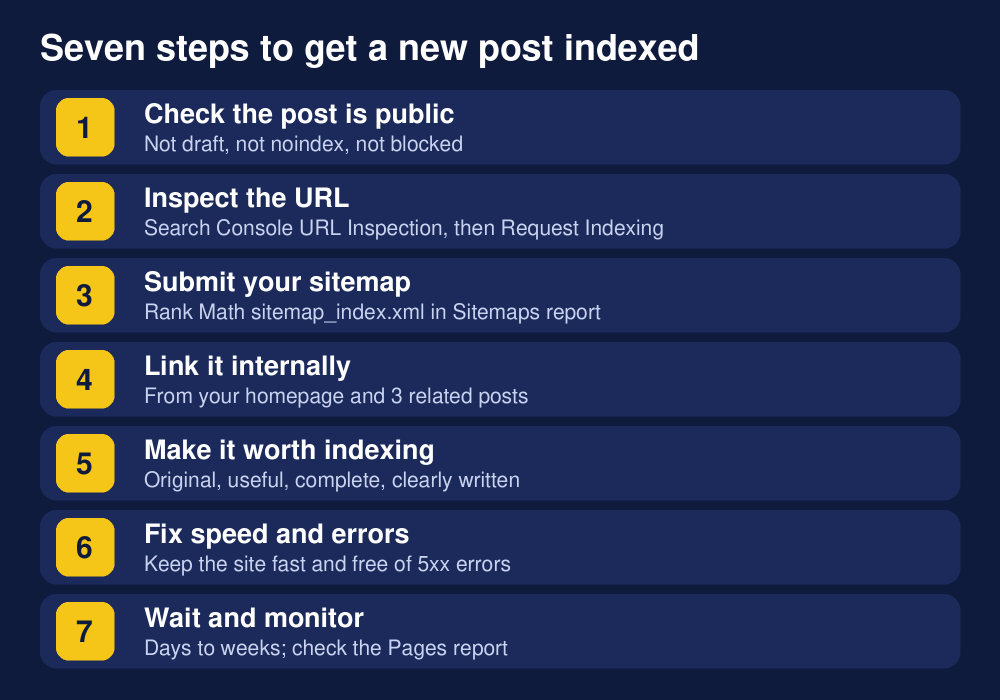
- Confirm the post is public. Status Published, visibility Public, no noindex in the Rank Math Advanced tab, and the Reading setting that discourages search engines unticked.
- Inspect the URL in Search Console and, if it is eligible, request indexing once.
- Make sure your sitemap is submitted and contains the new URL (open it in the browser and look).
- Add internal links. Link to the new post from your homepage or a hub page and from at least three related older posts, using descriptive anchor text. Google discovers most pages by following links, and a post with no links pointing to it is called an orphan page. Our guide to starting a blog in Nigeria and our step by step blog setup are examples of pages that can pass visitors and crawlers to new posts.
- Make the post worth indexing. Answer the search intent fully, include original detail from your own experience, cite sources, use real images with alt text and avoid padding.
- Keep the site healthy. Fast loading, mobile friendly, HTTPS, and no repeated server errors.
- Wait and monitor. Check the URL Inspection result after a few days and the Pages report weekly.
Rank Math settings worth checking
Rank Math is the SEO plugin many Nigerian bloggers use, and its defaults are sensible, but check these areas after install or a redesign. In Titles and Meta, confirm that Posts and Pages are not set to noindex. Consider setting thin archive types, such as tags, to noindex if you do not use them. In Sitemap Settings, confirm the sitemap is enabled and includes posts. In General Settings then Edit robots.txt, check that you are not blocking important folders. In the Advanced tab of each post, check that Robots Meta is on the default (index, follow) unless you chose otherwise, and that the canonical URL is empty or correct.
Rank Math also has an Instant Indexing module. It is built for the IndexNow protocol used by Bing and some other search engines, and it can connect to Google’s Indexing API. Read the next section before relying on that for blog posts.
The Indexing API myth
You will see YouTube videos and plugins promising instant Google indexing through the Indexing API. Google’s own documentation says the API can only be used to crawl pages with JobPosting structured data or BroadcastEvent embedded in a VideoObject, which means job listings and livestream pages. A normal blog post does not qualify, so do not build your indexing plan around it, and avoid paying for services that promise to force indexing. The honest and safe methods are the ones in this guide: Search Console, sitemaps, internal links and quality.
How long does indexing take?
Google says crawling can take anywhere from a few days to a few weeks. Sites with a strong history, regular publishing and many links often see new posts indexed within days. New sites with no links may wait longer, and low-value pages may be left out indefinitely. If a post is still missing after about three or four weeks, and the inspection shows no technical block, treat it as a quality signal: improve the content, add internal links, and request indexing again once after a meaningful update.
Content quality: the most common hidden reason
When every technical box is ticked and Google still says “Crawled – currently not indexed”, the page usually lacks something. Common problems on Nigerian blogs include rewriting a news story that many sites have already covered with no new angle, publishing dozens of short posts on near-identical keywords, copying text from other sites, and using auto-generated content with no checking. Instead, give Google a reason to keep your page: original reporting or testing, local detail that global sites miss, clear structure, updated facts with dates, and a useful FAQ. Our guide to making money blogging in Nigeria explains why building a small number of strong pages first usually works better than publishing at volume.
Common mistakes to avoid
- Clicking Request Indexing repeatedly for the same URL. Google says it does not help.
- Blocking a page in robots.txt and adding noindex to the same page. Google cannot see the noindex if it cannot crawl.
- Leaving the “discourage search engines” box ticked after launch.
- Submitting a sitemap full of redirects, 404 pages or noindex pages.
- Buying fake backlinks or paid “instant indexing” services.
- Changing URLs without 301 redirects.
Frequently asked questions
How do I get my Nigerian blog posts indexed on Google?
Verify your site in Google Search Console, inspect the new URL and request indexing, submit your sitemap, link to the post from other pages on your site, and publish content that is original and useful. Then give Google time.
Why is Google not indexing my website pages?
The most common reasons are a noindex tag or the WordPress “discourage search engines” setting, a robots.txt block, a new site with few links, slow or erroring hosting, duplicate or thin content and canonical problems. URL Inspection tells you which one applies.
How long does Google take to index a new blog post?
Google says a few days to a few weeks. New sites can wait longer than established ones.
What does “Crawled – currently not indexed” mean?
Google visited the page but decided not to add it to the index for now. Google says it is common. Improve the page’s quality and internal links and check it with URL Inspection.
What does “Discovered – currently not indexed” mean?
Google knows the URL but has not crawled it yet, often to avoid overloading the site. Make sure the page is linked and in your sitemap, and check your server speed.
Can I force Google to index my page?
No. You can request indexing and submit a sitemap, but Google decides. The Indexing API is limited to job posting and livestream pages.
How many times can I request indexing?
There is a quota for individual URL submissions, and repeated requests for the same URL do not speed things up. Submit once per meaningful update.
Does a sitemap guarantee indexing?
No. A sitemap helps Google discover URLs, but it is a hint. Google still decides what to index.
Should I noindex tag and category pages?
If they are thin or duplicate your posts, noindex is often sensible. Keep category pages indexed only if they have unique introductions and genuinely help readers find content.
Do I need Search Console for a small blog?
Yes. It is free and is the only place that shows Google’s own view of your pages, errors and search queries.
Sources and notes: Google Search Central, “Ask Google to recrawl your URLs”; Google Search Console Help, “Page indexing report”; Google Search Central, “Build and submit a sitemap” and Indexing API quickstart (all read on 6 November 2026). Settings names in WordPress and Rank Math can change between versions, so check your own dashboard. This guide is general advice and cannot guarantee indexing.
Join the discussion
Have you tried this, or do you have a question we did not answer? 1 reader has already shared their view. Naijatipsland members help each other with real, first-hand experience.






Have you got a post that Google refuses to index? Tell me what status Search Console shows (Discovered or Crawled, currently not indexed, noindex, and so on) and I will try to point you in the right direction. Google’s own advice is to request indexing once and then fix the cause rather than click the button repeatedly.
— Ade Adeniyi