
Last updated: 15 October 2026 · By Naijatipsland Editorial Team · Editorial policy
USSD codes are short numbers like *310# that you dial from any phone to check airtime, check data, buy a bundle or handle your NIN, with no internet needed. They are handy, but they change, and many websites still list old ones. This guide collects the codes that 2026 guides agree on for MTN, Airtel, Glo and 9mobile (now T2), and flags the ones that rest on a single source.
Codes can change without notice. If one stops working, check your network’s app or customer care. Never dial a code a stranger sends you.
The short answer
- *310# shows your airtime balance on all four networks.
- *323# shows your data balance on all four networks.
- *312# opens data plans on Airtel, Glo and 9mobile (and is listed by the NCC as the data-buying code on any network).
- *303# lets you borrow airtime or data.
- *346# retrieves your NIN; *996# is the code reported for checking whether your SIM is linked to your NIN.

Codes for all networks
Check airtime balance
Dial *310# on MTN, Airtel, Glo and 9mobile. On Airtel, *310*1# shows your bonus balance.
Check data balance
- MTN: *323# opens a menu; *323*4# shows main and bonus data with expiry dates, and texting 2 to 323 also works.
- Airtel: *323#.
- Glo: *323#, or send INFO to 312.
- 9mobile (T2): *323#. The old *228# and *232# codes are retired.
Buy data
Dial *312#, then follow the menu. Glo and Airtel list it prominently; for MTN you may do better in the myMTN app or by dialling the plan code your network gives you. Check our guides to Airtel data plans and Glo data plans before you buy.
Borrow airtime or data
Dial *303#. Eligibility and fees depend on your network and usage, so read the terms on the screen before accepting.
Share airtime or data
Dial *321# on MTN, Airtel and Glo (listed in one guide; 9mobile not confirmed). Glo’s data share code is also *321#.
Recharge with a card
Dial *311*PIN#, replacing PIN with the digits on the card.
Other common codes
*305# for value-added services and 300 for customer care were listed for all four networks in one guide. The same guide mentioned an NCC do-not-disturb code but did not give it, so we have left it out. Check the NCC site or your network. We also did not find a reliable 2026 source for “check my number” codes, so we have not listed any.
NIN and SIM codes
The NCC ordered phone lines to be linked to the National Identification Number (NIN). The deadlines it set in 2024 have passed, but the codes still matter if your line is barred or you want to check your status.
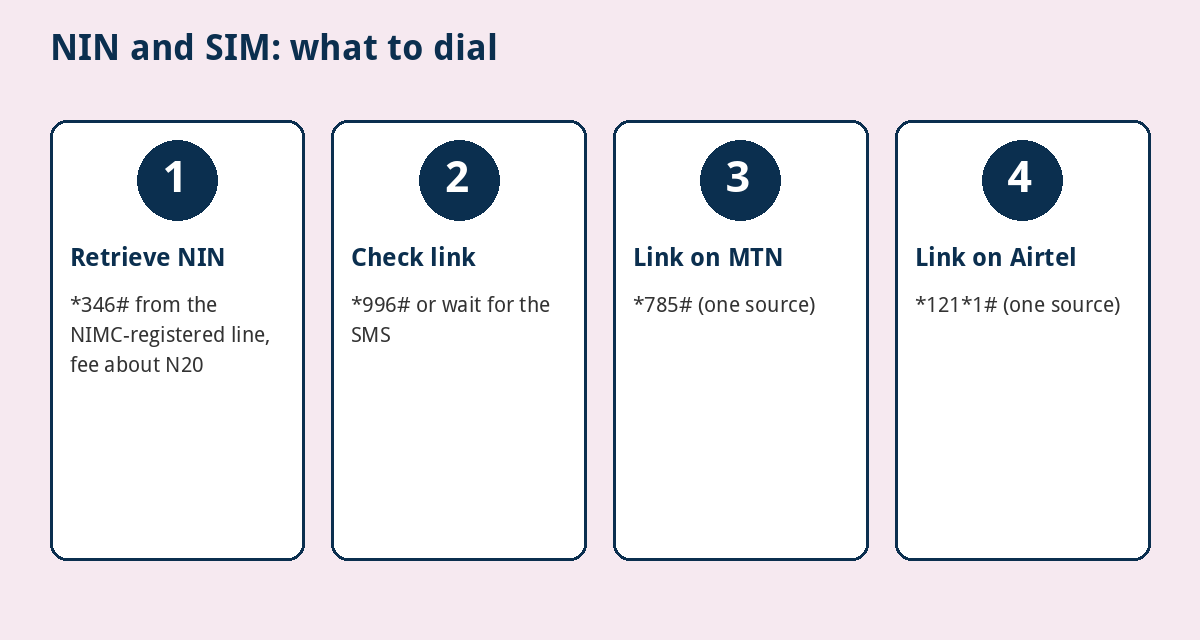
- Retrieve your NIN: dial *346# from the number you registered with NIMC, press 1, confirm the fee and your 11-digit NIN appears. A June 2026 guide puts the charge at about N20, so keep airtime. Screenshot the number quickly because the display can time out.
- Check whether your SIM is linked: dial *996#, or wait for your operator’s SMS confirmation. A 2024 explainer reported this code; confirm it still works on your network.
- Link your NIN (reported by one guide, June 2026): MTN *785# or *785*NIN#; Airtel *121*1# (NIN Capture); Glo *109*NIN# or SMS UPDATENIN NIN FirstName LastName to 109; 9mobile through its online portal or *996#. The same guide said *996# works on all networks. These are single-source, so check with your network first.
If you did not get a message confirming your NIN was received, your submission did not reach your provider, and you should visit a service centre. You can register at most four SIMs per network, and the NCC has ruled out proxy linking for individuals, so nobody can legally link your NIN for you. Linking codes contain your NIN, so do not dial them where others can see your screen.
MTN, Airtel, Glo and 9mobile quick table
- Airtime: *310# on all four.
- Data balance: *323# on all four (MTN *323*4# for expiry detail).
- Buy data: *312# (Airtel, Glo, 9mobile and NCC-listed for all).
- Borrow: *303# on all four.
- Share: *321# on MTN, Airtel and Glo.
- Recharge: *311*PIN# on all four.
Note that 9mobile is now T2 in NCC reporting. Some guides still say 9mobile, and codes for T2 should be confirmed with the operator.
Stay safe

- Dial only codes from your network’s official site, app or customer care.
- Do not dial a code just because a caller or message tells you to. Some codes change settings on your line, and a stranger who pushes you to dial one is a red flag.
- Never share your PIN, OTP or NIN with anyone who calls you.
- If a code stops working, check the app or call customer care.
- Do not buy data from random WhatsApp sellers. Use the network or an authorised app.
For speeds and coverage, see our guide to the fastest network in Nigeria.
Running through data too fast? See how to stop your phone using data in the background.
Frequently asked questions
What is the code to check airtime balance in Nigeria?
*310# on MTN, Airtel, Glo and 9mobile.
What is the code to check data balance?
*323# on all four networks. MTN’s *323*4# shows main and bonus data with expiry.
How do I buy data with a code?
Dial *312# and follow the menu.
How do I find my NIN with a phone code?
Dial *346# from the number you used when you registered with NIMC. The charge was about N20 in a June 2026 guide.
How do I check if my NIN is linked to my SIM?
Dial *996# or look for your operator’s SMS confirmation, and confirm the code with your network.
Why does a code say invalid?
Codes change, some are tied to a plan or network, and some need airtime. Try the network’s app or call customer care.
Bottom line
Memorise *310# for airtime, *323# for data, *312# for plans and *346# for your NIN. Treat everything else as something to confirm with your network before relying on it.
Sources
- Gosub: Nigeria USSD codes (updated 25 August 2026)
- AidaPay: Data balance codes 2026
- OgaJob: Code for NIN, USSD guide for MTN, Glo, Airtel and 9mobile (2026)
- TechEconomy: Top 10 NIN-SIM linkage FAQ
Related: how to check your BVN and link it to your bank accounts.
Related: how to block your ATM card or bank account after theft or fraud.