


TL;DR:
- A secure user registration flow creates accounts in a pending state until email verification completes, preventing access and session creation until verification is confirmed. Backend controls, including hashed tokens, expiry checks, and route gating, are essential to enforce security and thwart attacks. Following NIST 800-63B standards for passwords and using vetted libraries like Auth0 or Supabase Auth balance security with usability effectively.
A user registration workflow is the full sequence of steps a user follows to create, verify, and activate an account on your platform, designed to balance security with a smooth experience. For developers and product managers, getting this sequence right means the difference between a platform users trust and one that leaks data or drives signups away. Standards like NIST SP 800-63, guidelines from OWASP, and modern frameworks like Next.js auth flows define what a secure and usable sign up flow looks like in 2026. This guide covers every critical layer: account creation, email verification, password policy, backend authorization, and the pitfalls that trip up even experienced teams.
What are the essential components of a user registration workflow?
A secure user registration workflow separates account creation from session activation. The account is created in a pending state the moment a user submits the form. No session is granted, and no protected resource is accessible until email verification is complete. This design, used in Next.js auth flows, returns the same success status for all registration outcomes, which prevents attackers from detecting whether an email already exists in your system.

Email verification is the gate between account creation and account activation. The verification link must expire within a defined window. Activation links expire within 24 to 48 hours in most production systems, which limits the window for stale or stolen links to be abused. Once a user clicks the link, the token is consumed and marked as used. Single-use tokens are non-negotiable.
Password requirements should follow NIST SP 800-63B, which mandates screening passwords against known breach databases at the point of creation or change, and explicitly discourages forced periodic resets unless there is evidence of compromise. This is a significant departure from legacy policies that required monthly resets, which research shows actually weakens security by pushing users toward predictable patterns.
The core components of a well-structured account creation workflow include:
- Pending account state: Create the record in the database before verification, but block all authenticated access.
- Expiring email verification tokens: Single-use, time-limited links sent to the registered address.
- Compromised password screening: Check submitted passwords against breach databases like HaveIBeenPwned at registration.
- No auto sign-in before verification: Verification gating session creation reduces bot abuse and prevents unauthorized session use.
- Generic success responses: Return identical messages for existing and new email addresses to block enumeration.
- Vetted authentication libraries: Use Auth0, Passport.js, or framework-native solutions rather than custom token logic.
Pro Tip: Never build your own token generation and validation logic from scratch. Vetted libraries handle edge cases in cryptographic validation that are easy to miss in hand-rolled implementations.
How to implement backend authorization and security controls
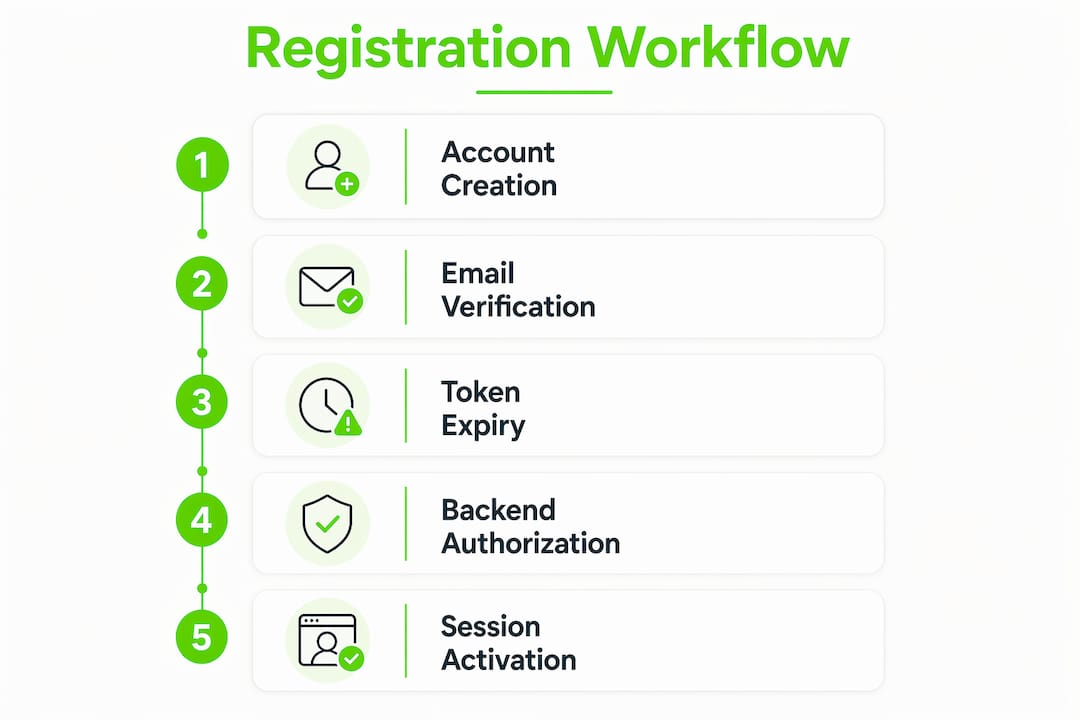
Backend security controls are the enforcement layer that makes your onboarding workflow actually secure. UI-level gating, such as hiding a dashboard from unverified users, is not sufficient. The backend must independently verify the user’s status on every protected request.
Here is the correct sequence for implementing backend authorization within the registration process:
- Store the verification token as a hash. Never store the raw token in your database. Hash it with a function like SHA-256 before saving, and compare hashes at verification time.
- Check token expiry on every verification attempt. Reject tokens past their expiration timestamp regardless of hash match.
- Mark tokens as used immediately after successful verification. Update the database record in a single transactional operation to prevent race conditions.
- Gate protected routes at the server level. Check the "email_verified` flag in the database on every request to a protected resource, not just at login.
- Apply rate limiting per IP and per account. Rate limiting per account and IP with exponential backoff deters brute-force and enumeration attacks across distributed sources.
- Rotate sessions after authentication state changes. Issue a new session token whenever a user verifies their email or changes their password.
Session security deserves specific attention. Session tokens require cryptographically strong random values with HttpOnly, Secure, and SameSite cookie flags set. These three flags together prevent JavaScript-based token theft, unencrypted transmission, and cross-site request forgery in one configuration block.
| Security control | Purpose | Implementation note |
|---|---|---|
| Hashed verification tokens | Prevents database exposure from leaking usable tokens | Use SHA-256 or bcrypt; never store raw tokens |
| Token expiry check | Limits the window for stolen link abuse | Reject tokens older than 48 hours |
| Single-use token invalidation | Prevents replay attacks | Mark as used in a transactional DB update |
| Per-IP and per-account rate limiting | Blocks brute-force and enumeration | Apply exponential backoff after failed attempts |
| Session rotation on state change | Prevents session fixation attacks | Issue new session ID after email verification |
Pro Tip: Backend authorization checks on every protected route are the single most overlooked control in registration security. UI-only gating is trivially bypassed with a direct API call.
Best practices for password policy and UX in signup flows
Password policy is where security and user experience collide most visibly. The NIST 800-63B standard recommends a minimum of 15 characters, allows paste and autofill, and removes composition rules like “must include a number and a symbol.” This approach improves both security and usability because longer passphrases are harder to crack and easier for users to remember.
The key password policy practices for your registration best practices checklist are:
- Allow paste and autofill in password fields. Blocking paste actively discourages password manager use, which weakens security across your entire user base.
- Screen passwords against breach databases. Reject any password found in known breach lists and give the user a clear, non-shaming explanation.
- Drop composition rules. Requiring uppercase, numbers, and symbols pushes users toward predictable substitutions like “P@ssw0rd.”
- Eliminate forced periodic resets. Only require a reset when compromise is detected or confirmed.
- Use real-time validation feedback. Show password strength indicators as the user types, not after they submit.
- Never use security questions or password hints. Both are trivially guessable from public social media profiles.
Designing password forms compatible with password managers is a concrete technical step, not just a policy decision. Set autocomplete="new-password" on registration fields and autocomplete="current-password" on login fields. This single attribute signals to browsers and password managers like 1Password and Bitwarden that the field is ready for autofill, which directly improves completion rates on your sign up flow.
Pro Tip: Progressive disclosure of password rules works better than showing all requirements upfront. Reveal each rule as satisfied, so users feel progress rather than pressure.
Common pitfalls in user registration workflow design
Most registration security failures are not cryptographic. Modern signup security issues arise from poor system defaults like session handling and token validation, not from broken encryption algorithms. Knowing the specific failure modes lets you audit your own implementation with precision.
The most damaging pitfalls in user sign up procedures include:
- Hand-rolled authentication logic. Writing your own token validation code introduces subtle vulnerabilities. Custom authentication logic commonly misses signature verification and expiry checks that vetted libraries handle correctly.
- Auto sign-in before email verification. Granting a session immediately after form submission lets bots create accounts and abuse authenticated endpoints at scale.
- Exposing account existence. Returning different error messages for “email not found” versus “wrong password” tells attackers which emails are registered. Use identical generic responses for both cases.
- Insecure cookie configuration. Missing HttpOnly or Secure flags on session cookies expose tokens to JavaScript injection and unencrypted network interception.
- Weak account recovery flows. A password reset flow with no rate limiting or token expiry is a separate attack surface that undermines your entire registration security model.
- No MFA for privileged accounts. Admin and moderator accounts on platforms like Naijatipsland require phishing-resistant multi-factor authentication, not just a strong password.
Threat modeling identification and authentication separately prevents common logic errors in login and registration security. Teams that treat login and registration as one problem routinely miss authorization gaps that only appear in the registration path.
The role of registration in online communities is significant enough that a single misconfiguration can expose your entire user base. Audit your registration path with the same rigor you apply to payment flows.
How do popular tools compare for implementing registration workflows?
Choosing the right library or service for your account creation workflow determines how much security you inherit versus how much you must build yourself. The table below compares the most widely used options across the controls that matter most in 2026.
| Tool / Library | Email verification | Rate limiting | Password screening | MFA support | Session management |
|---|---|---|---|---|---|
| Auth0 | Built-in | Built-in | Configurable | Yes, phishing-resistant | Managed |
| Next.js Auth (Auth.js) | Manual setup required | Manual setup required | Manual setup required | Plugin-based | Configurable |
| Passport.js | Manual setup required | Manual setup required | Manual setup required | Strategy-based | Manual |
| Supabase Auth | Built-in | Built-in | Partial | Yes | Managed |
| Firebase Authentication | Built-in | Built-in | No | Yes | Managed |
Auth0 and Supabase Auth provide the most complete out-of-the-box coverage for registration process optimization, including email verification flows and session management. Next.js Auth (Auth.js) and Passport.js give you more control but require you to implement rate limiting, token hashing, and password screening yourself. For teams without a dedicated security engineer, managed solutions reduce the surface area for mistakes significantly.
NIST assurance levels help you decide which tool tier your platform actually needs. A low-risk community forum requires Identity Assurance Level 1 (IAL1), while a platform handling financial transactions or health data requires IAL2 with identity proofing. Matching your tool choice to your assurance level requirement avoids both under-engineering and unnecessary complexity.
Pro Tip: Before selecting a library, check its GitHub commit history and open security issues. A well-maintained library with active security patches is worth more than a feature-rich one with a stale repository.
Key takeaways
A secure user registration workflow requires pending account creation, expiring single-use verification tokens, backend authorization checks, and password policies aligned with NIST SP 800-63B to protect users and prevent abuse.
| Point | Details |
|---|---|
| Separate creation from activation | Create accounts in a pending state and block all access until email verification is complete. |
| Hash and expire verification tokens | Store only hashed tokens, enforce expiry windows, and invalidate tokens immediately after use. |
| Follow NIST 800-63B password policy | Require 15-character minimums, screen against breach databases, and eliminate forced periodic resets. |
| Use generic responses everywhere | Return identical messages for existing and non-existing accounts to prevent email enumeration attacks. |
| Choose vetted libraries over custom code | Auth0, Supabase Auth, and Auth.js reduce the risk of hand-rolled token validation vulnerabilities. |
What I’ve learned about balancing security and usability in registration
At Naijatipsland, we have watched registration flows fail in two predictable directions: too loose and too strict. Platforms that skip email verification to reduce signup friction end up with bot-inflated user counts and abused session endpoints. Platforms that add CAPTCHA, mandatory phone verification, and complex password rules at registration lose real users before they ever post a single comment.
The uncomfortable truth is that most security failures in registration are not about cryptography. They are about defaults. A developer who ships a registration form without setting the SameSite cookie flag, or who returns different error messages for existing versus new emails, has introduced two serious vulnerabilities in under ten minutes of work. The fix is equally fast, but only if you know to look.
My recommendation is to start with a managed authentication service, get the basics right, and then layer in customization as your platform scales. Threat modeling identification and authentication separately is the practice that catches the most gaps. Run your registration flow through a threat model before launch, not after your first incident. Use NIST assurance levels to calibrate how much friction is actually justified for your specific risk profile. And test your recovery flows with the same rigor as your registration path, because a weak password reset undermines every control you built upstream.
— Naijatipsland
Build better registration flows with Naijatipsland
Naijatipsland covers the technical and community dimensions of online platform growth, from secure user account setup to audience engagement strategies that work in the Nigerian and African digital context.
If you are building or managing a platform where users register, post, and interact, the resources on Naijatipsland give you practical guidance grounded in real platform experience. Read our guide on joining online forums to understand what users expect from a registration experience before they commit to a community. For platform builders focused on growth, the social media workflow guide covers how secure onboarding connects directly to audience retention. Stay current with platform trends and entertainment updates that shape what Nigerian users expect from digital communities in 2026.
FAQ
What is a user registration workflow?
A user registration workflow is the structured sequence of steps covering account creation, email verification, and session activation that a platform uses to onboard new users securely. It includes backend controls like token validation, rate limiting, and session management.
Why should you avoid auto sign-in before email verification?
Granting a session before email verification lets bots create accounts and abuse authenticated endpoints at scale. Verification gating session creation is a foundational control against automated abuse.
What does NIST SP 800-63B say about passwords?
NIST SP 800-63B requires screening passwords against compromised lists at creation or change, mandates a minimum length of 15 characters, and prohibits forced periodic resets unless compromise is detected.
How do you prevent email enumeration during registration?
Return identical generic responses for both existing and non-existing email addresses during registration and login. Combine this with rate limiting per IP and per account to block automated enumeration attempts.
Which authentication library is best for a secure sign up flow?
Auth0 and Supabase Auth provide the most complete built-in coverage for email verification, session management, and MFA. Next.js Auth and Passport.js offer more control but require manual implementation of rate limiting and token security.