
If you think your crypto wallet has been compromised, the first priority is not figuring out exactly who attacked you. It is determining what level of access the attacker may have gained and preventing further losses.
There is a major difference between visiting a phishing website, connecting your wallet to it, approving a token, signing a malicious transaction and exposing your seed phrase or private key.
Some incidents can be contained by revoking permissions. Others mean the wallet itself can no longer be trusted and should be abandoned.
If an attacker has obtained your seed phrase or private key, simply changing your wallet password, disconnecting from a website or revoking one token approval will not solve the problem. Anyone possessing those credentials can independently sign transactions from the wallet. MetaMask, for example, warns that possession of a Secret Recovery Phrase gives access to the accounts derived from it.
This guide explains how to tell whether your crypto wallet has been compromised, what different types of wallet compromise actually mean, and what you should do next.
What to Do Immediately If You Think Your Crypto Wallet Is Compromised
If there is any realistic possibility that an attacker has access to your wallet, act before investigating every detail.
- Stop interacting with the suspicious website or application. Do not sign additional transactions, messages or approval requests while trying to investigate what happened.
- Check your wallet address on a blockchain explorer. Look for outgoing transfers, token transfers, contract interactions or approvals that you do not recognize. An explorer lets you examine blockchain activity independently of what your wallet interface displays. MetaMask similarly recommends reviewing the time, recipient, dapp and value of suspicious transactions when investigating unauthorized activity.
- Check existing token approvals if you use an EVM wallet. A malicious contract may still have permission to spend particular tokens even after you leave or disconnect from the website. Revoking the approval removes that spending permission.
- If your seed phrase or private key may have been exposed, use a clean device to create a completely new wallet with a new recovery phrase. Do not create another account under the compromised recovery phrase and assume it is safe. MetaMask specifically recommends migrating to a different Secret Recovery Phrase when a wallet is affected by a sweeper.
- Move remaining assets to the new wallet if it can be done safely. Prioritize valuable and transferable assets. If you suspect a sweeper bot, however, repeatedly sending gas into the compromised wallet can give the attacker more assets to steal. Sweeper scripts are designed to react automatically when funds reach a compromised address.
- Treat the device as potentially compromised if malware is possible. Stop using it to access valuable wallets until it has been investigated and cleaned. A clipboard hijacker, keylogger or credential stealer can make moving funds from the same machine dangerous. Ledger warns that malware can alter copied crypto addresses, causing users to send funds to an attacker-controlled address.
- Preserve evidence. Save transaction hashes, attacker addresses, screenshots, suspicious URLs, messages and timestamps. If stolen funds reach a centralized exchange or other identifiable service, that information may be useful when reporting the theft to the service or relevant authorities. Do not pay anyone who claims they can “guarantee” the recovery of stolen cryptocurrency.
The correct next step depends heavily on what happened before you noticed the problem.
Is My Crypto Wallet Actually Compromised?
A suspicious website appearing on your screen does not automatically mean an attacker controls your wallet.
The easiest way to assess the situation is to think in terms of what authority you gave away.
| What happened? | Typical risk level | Does the attacker control the wallet? | Likely response |
| You only visited a malicious site | Usually low | Normally no | Close it and check for downloads or other suspicious activity |
| You connected your wallet | Low by itself | No | Disconnect and inspect subsequent requests |
| You signed a malicious transaction or signature | High | Depends on what was signed | Inspect the transaction/signature and permissions immediately |
| You granted a malicious token approval | High for approved assets | Not necessarily | Revoke the approval immediately |
| You exposed your seed phrase/private key | Critical | Yes | Create a new wallet with a new seed and migrate |
| Malware infected your device | Potentially critical | Possibly | Stop using the device for crypto and migrate from a clean environment if keys may be exposed |
| A sweeper bot is draining deposits | Critical | Effectively yes | Abandon the compromised seed/key and migrate what can safely be recovered |
Understanding these differences can prevent both underreacting and overreacting.
1. You Simply Visited a Malicious Website
Merely loading a phishing or malicious crypto website does not normally give the website permission to transfer assets from a self-custody wallet.
In a typical wallet-drainer attack, the website still needs the victim to take another action, like connecting a wallet, signing a message, approving a token allowance, signing a transaction or revealing a recovery phrase. MetaMask explains that even connecting a wallet to a site does not by itself allow the site to move funds without further consent from the user.
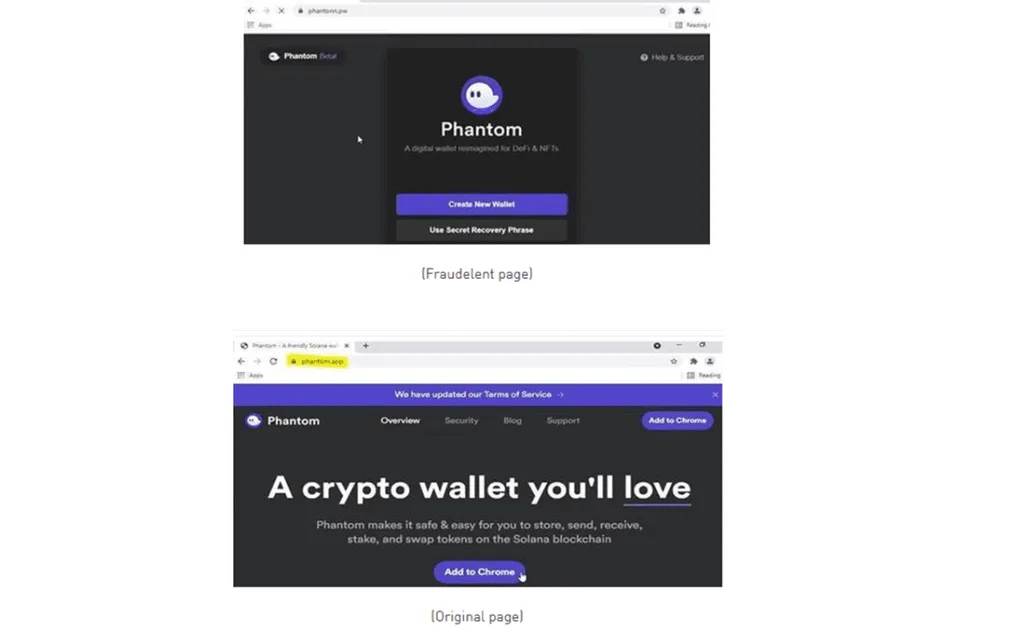
(Source: Cyber and Fraud Centre Scotland)
That does not mean visiting malicious sites is completely harmless. A site may attempt to trick you into installing malicious software, downloading a fake wallet extension, entering your recovery phrase or approving something you do not understand.
If you visited a suspicious crypto site but did not connect a wallet, sign anything, enter your recovery phrase, download anything or install software, your wallet keys are unlikely to have been exposed through the normal phishing flow.
This is an important distinction for anyone asking, “Can my crypto wallet be hacked just by visiting a website?”
In most wallet-drainer scams, another action is required.
2. You Connected Your Wallet to a Malicious Site
Connecting a wallet is also frequently misunderstood.
A wallet connection allows a dapp to interact with your wallet interface and typically exposes information like your public wallet address. It can then ask you to sign messages or submit transactions.
Connecting is not the same thing as giving the website your private key.
MetaMask states that connecting to a site alone does not allow it to do anything with your funds unless you subsequently consent to an action. If all you did was connect, disconnect the site from your wallet and check whether you signed or approved anything afterward.
But there is an important catch.
Disconnecting a dapp does not revoke token approvals that you previously granted.
MetaMask explicitly distinguishes these two actions: disconnecting prevents the dapp from maintaining its normal wallet connection, while revoking an allowance removes permission for a contract to move approved tokens.
That means disconnecting from a scam site is useful, but it is not enough if you also granted it spending permissions.
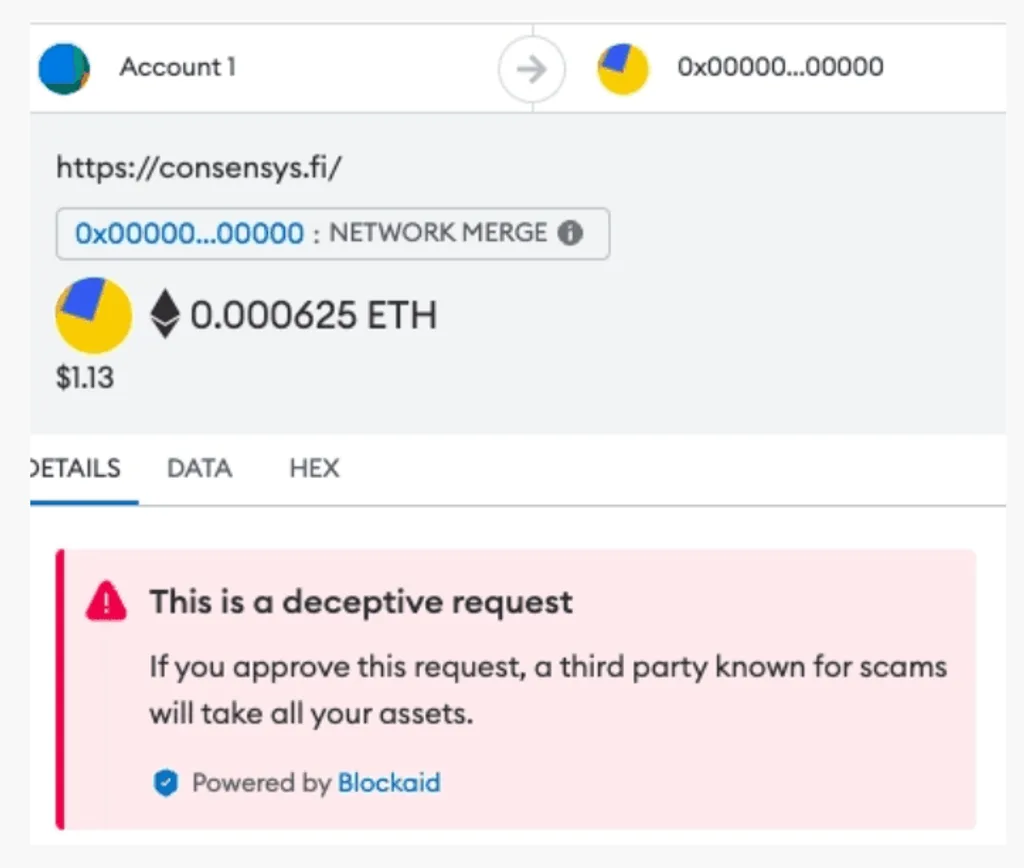
3. You Signed a Malicious Transaction or Message
This is where the risk becomes much more serious. A signature is cryptographic authorization from your wallet. What happens after signing depends on what the signature authorized.

(Source: Blockaid)
A malicious transaction could directly send cryptocurrency to an attacker. It could also approve a contract, transfer an NFT, interact with a malicious smart contract or give another address permission to perform an action.
There are also malicious off-chain signatures. MetaMask describes signature phishing as an attack in which a victim signs an off-chain message that can later be used by an attacker to steal assets. The user may believe they are signing something harmless while the message actually grants powerful permissions.
Ethereum’s ERC-2612 standard proves why signatures can matter even when the user does not appear to be sending an ordinary on-chain approval transaction: its permit mechanism allows an allowance to be changed using a signed message.
Therefore, “I didn’t send anything” does not necessarily mean nothing dangerous was authorized.
If you signed something suspicious, inspect exactly what happened. Look at the transaction on the relevant block explorer, check token approvals and determine whether the action was a direct transfer, an approval, an NFT permission or another form of authorization.
A transaction that simply transferred assets does not automatically mean your private key was exposed. You may have authorized one bad transaction while keeping exclusive control over the key.
However, if you cannot determine what a suspicious signature authorized and assets remain in the wallet, moving them to a new wallet can be the safer option.
Confirmed blockchain transactions generally cannot simply be reversed by your wallet provider. MetaMask states that confirmed transactions are final.
4. You Granted a Malicious Token Approval
Token approvals are one of the most important concepts to understand when investigating a compromised crypto wallet.
Many decentralized applications need permission to interact with tokens in your wallet. An approval allows a smart contract or another address to spend a specified token on your behalf. The problem is that some approvals can be extremely broad.
An attacker may persuade a victim to approve a large or effectively unlimited amount of a token. MetaMask warns that malicious approvals can give a dapp excessive access and may allow it to spend all of the approved token type.
This means a scammer does not necessarily need your seed phrase to drain certain assets.
For example, you might approve a malicious contract to spend your USDT. The attacker could then use that authorization to transfer the approved USDT without possessing the private key itself.
Importantly, the compromise may be limited to the assets covered by that approval rather than the entire wallet. If the seed phrase and private key are secure, a malicious token approval does not automatically mean you must abandon the wallet.
The priority is to revoke the malicious approval as quickly as possible. After revoking it, disconnect the malicious dapp as well.
If you are unsure whether the incident involved only a token approval or something more serious, moving valuable assets to a fresh wallet provides an additional layer of protection.
5. Your Seed Phrase or Private Key Was Exposed
This is a fundamentally different situation. If another person has your seed phrase or private key, the wallet itself must be considered compromised.
A private key is what allows transactions to be cryptographically authorized from an address. A seed or recovery phrase can derive the private keys for the accounts associated with that wallet.
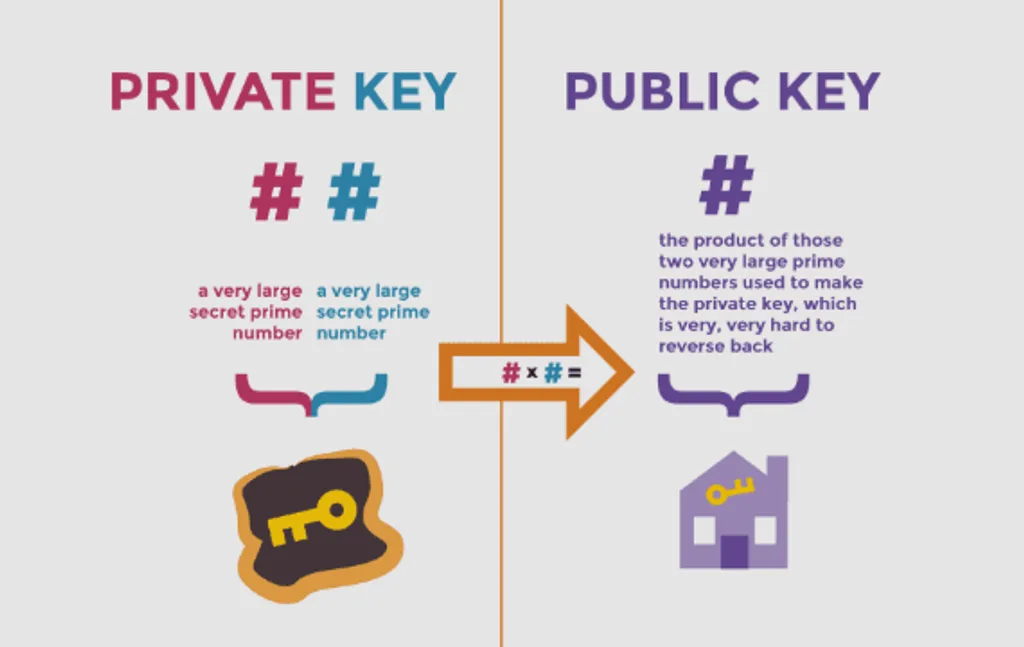
MetaMask warns that anyone with the Secret Recovery Phrase or relevant private keys can control the associated assets and send tokens from those accounts.
Changing your wallet password does not solve this problem because the attacker does not need your local wallet password if they already possess the underlying cryptographic secret. Similarly, creating another account under the same compromised recovery phrase is not an adequate fix.
The correct response is to create a completely new wallet with a completely new seed phrase, preferably from a trusted, clean device. Then migrate any assets that remain recoverable.
You should assume the old wallet can never again be trusted to hold significant funds.
Seed phrases are commonly stolen through fake support representatives, phishing websites, fake wallet applications and websites that ask users to “verify” or “synchronize” their wallet. Legitimate wallet support should not require you to hand over the recovery phrase. Coinbase and MetaMask both explain that recovery phrases should not be shared with others.
6. Malware or Clipboard Hijacking May Be Involved
Sometimes the wallet is not the original point of compromise. The computer or smartphone may be compromised instead.
Crypto-targeting malware can attempt to capture credentials, monitor activity or manipulate information used during a transaction. One particularly dangerous form is clipboard hijacking.
You copy the intended wallet address, but malware replaces the clipboard contents with an attacker-controlled address before you paste it.
Ledger warns that malware can modify wallet addresses on infected PCs or smartphones and recommends verifying transaction details rather than trusting what appears on the computer alone. A warning sign is an address changing after copy-and-paste.
If that happens, stop making transactions from the device immediately.
Other warning signs can include unexpected wallet extensions, unfamiliar applications, unexplained browser behavior, security software warnings or transactions that appear inconsistent with what you thought you were approving.
If malware could have accessed your seed phrase or private keys, treat those keys as compromised. Do not generate your replacement wallet on the same potentially infected system. Create it from a trusted environment instead.
Hardware wallets can reduce some software-wallet risks because sensitive signing operations occur on a separate device, but users still need to verify transaction information displayed by that device. Ledger specifically recommends checking transaction details on the hardware wallet screen to defend against compromised computers that alter destination addresses.
7. A Sweeper Bot Is Draining the Wallet
A sweeper bot is one of the clearest signs that a wallet has suffered key-level compromise. Sweepers are automated scripts that monitor compromised addresses and rapidly transfer incoming assets to attacker-controlled wallets.
This can produce a frustrating pattern: you send cryptocurrency to the wallet to pay transaction fees or rescue another asset, and the newly deposited cryptocurrency disappears almost immediately.
MetaMask explains that sweeper scripts can monitor blockchain activity and act far faster than a human trying to manually move assets. Such attacks require the attacker to have the ability to sign transactions from the compromised wallet, typically because a recovery phrase or private key has been stolen.
If you believe a sweeper is active, do not repeatedly deposit more cryptocurrency into the address hoping you will be faster than the bot. The wallet should be treated as permanently compromised.
Create a new wallet using a new recovery phrase. Rescuing tokens, NFTs or other assets trapped inside a swept wallet can become technically difficult because moving them may require depositing the chain’s native asset for transaction fees, which the sweeper may immediately steal.
In complicated or high-value cases, specialist assistance may be required. Be extremely cautious about people who contact you first claiming they can recover the funds. Crypto theft victims are frequently attractive targets for follow-up scams.
How to Check Whether Funds Were Actually Stolen
Your wallet interface should not be your only source of information. Search your public wallet address using the appropriate blockchain explorer and compare what happened on-chain with your own activity.
Look specifically for unauthorized outgoing transactions, unexpected token transfers, unfamiliar contract interactions and approvals created shortly before assets disappeared. The sequence of transactions can often reveal what happened.
If an unfamiliar approval appears shortly before a token is transferred away, an approval-based drain may be involved.
If assets begin leaving without any recognizable preceding interaction and several unrelated asset types are affected, key compromise becomes a stronger possibility.
If every new deposit disappears shortly after arriving, a sweeper should be suspected.
If a transaction went to the wrong address after you copied and pasted a destination, investigate the possibility of clipboard malware or address poisoning.
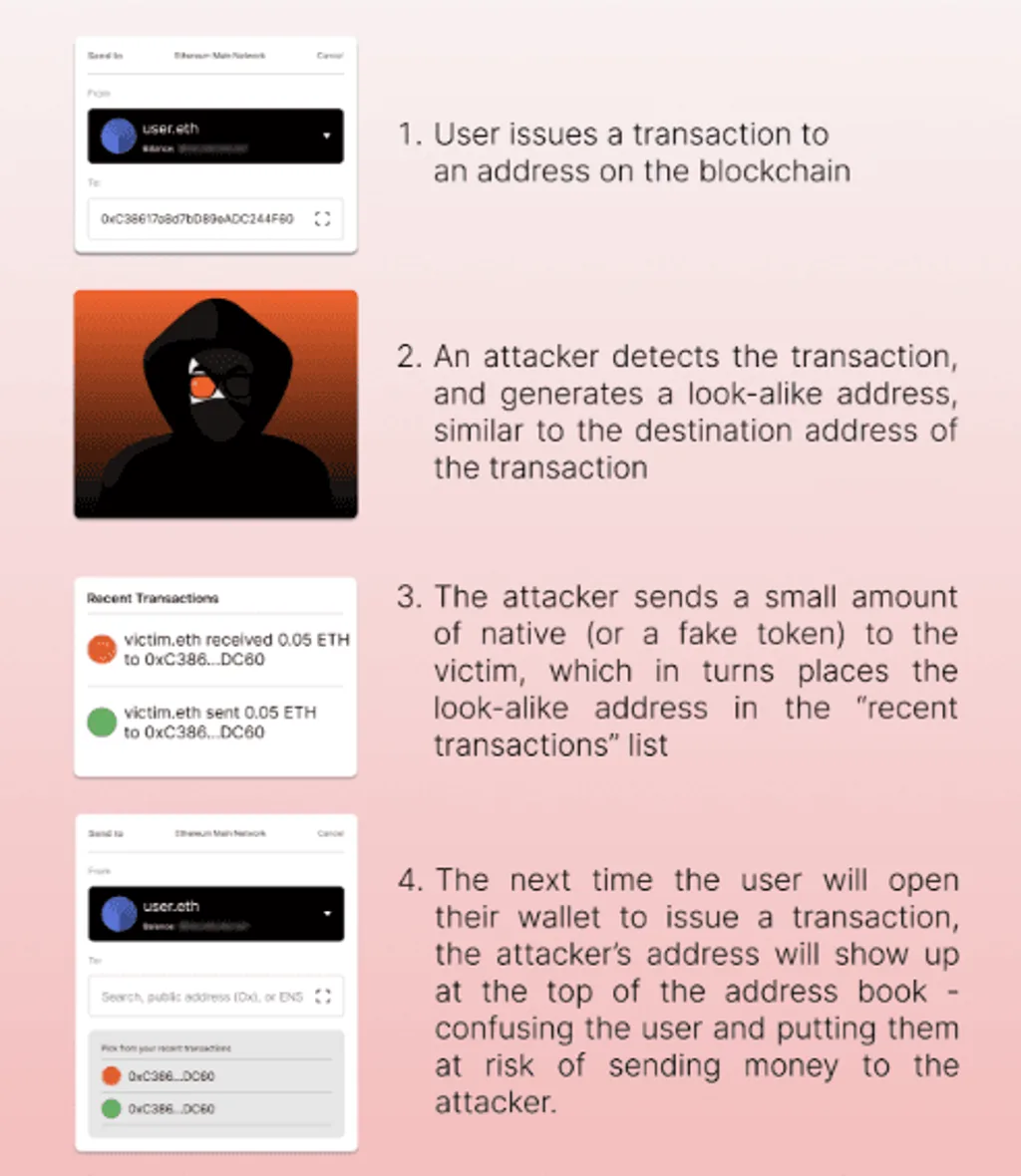
Address poisoning (Source: Blockaid)
These patterns are useful diagnostic clues rather than absolute proof. Attack methods vary, and sophisticated incidents may involve several techniques at once.
Does Revoking Token Approvals Make a Compromised Wallet Safe?
Only if the approval was the actual problem. Revoking an approval prevents the approved spender from continuing to use that allowance. That is the appropriate response when you granted a malicious contract permission but your underlying seed phrase and private keys remain secure.
Revoking approvals does not make a wallet safe if the attacker possesses the private key or seed phrase. In that situation, the attacker can simply sign transactions directly.
This is why determining the type of compromise matters so much.
Should You Disconnect Every Dapp?
Disconnecting suspicious or unused dapps is sensible wallet hygiene, but it should not be confused with emergency recovery. A connection and an allowance are different permissions.
MetaMask states that disconnecting a dapp does not automatically revoke token approvals that remain in place. Therefore, if you interacted with a phishing dapp, check both your connected applications and your token approvals.
Disconnecting addresses the first problem. Revoking addresses the second. Neither is sufficient if your seed phrase or private key has been stolen.
When Do You Need to Create a New Crypto Wallet?
A new wallet is clearly necessary when your seed phrase or private key has been exposed, when an attacker is able to independently sign transactions, or when a sweeper bot is operating on the wallet.
A new wallet is also strongly advisable when malware may have extracted wallet secrets or when unauthorized activity cannot be explained by a specific approval or transaction.
The decision is less clear-cut when the incident was limited to one malicious approval. If you know your keys were never exposed and can conclusively identify and revoke the malicious permission, the wallet itself may remain usable.
Similarly, signing a single malicious transfer does not necessarily expose your private key. The transaction may simply have tricked you into authorizing an action you did not intend.
As a practical rule:
Permission compromised: revoke the permission.
Key compromised: replace the wallet.
If you cannot confidently determine which situation you are dealing with, protecting substantial remaining assets in a fresh wallet is usually the more conservative approach.
Creating a New Wallet Means Creating a New Seed Phrase
This deserves emphasis. Importing your old seed phrase into another wallet application does not create a new secure wallet. Nor does reinstalling your wallet software. Nor does changing the wallet application’s password.
If the recovery phrase itself has been exposed, the replacement wallet must use a new cryptographically generated recovery phrase.
MetaMask’s guidance for sweeper-bot compromises specifically advises migrating to a new Secret Recovery Phrase rather than creating more accounts under the compromised one.
Once assets have been moved, the compromised seed should not be reused for storing funds.
Frequently Asked Questions
How do I know if my crypto wallet has been compromised?
The strongest signs include transactions you did not authorize, unexplained token transfers, unfamiliar approvals, assets disappearing soon after deposits, or evidence that your seed phrase or private key has been exposed.
Check the wallet address on the relevant blockchain explorer rather than relying only on the wallet application’s transaction history. MetaMask recommends comparing suspicious transactions against their time, recipient, associated dapp and value when investigating unauthorized activity.
Can a crypto wallet be hacked just by visiting a website?
Simply visiting a malicious website does not normally give it permission to move cryptocurrency from a self-custody wallet.
The attacker generally needs an additional action such as a wallet connection followed by a signature, token approval, transaction, malicious download or disclosure of the seed phrase. MetaMask specifically states that merely connecting a wallet does not allow a site to move funds without the user consenting to further actions.
Is my wallet compromised if I connected it to a scam website?
Not necessarily.
Connecting alone does not normally expose your private key or authorize asset transfers. Disconnect the suspicious dapp and determine whether you subsequently signed anything or granted token approvals.
Remember that disconnecting a dapp does not revoke existing approvals.
What should I do if I signed a malicious crypto transaction?
Stop interacting with the site and inspect the transaction on a blockchain explorer.
Determine whether you authorized a direct transfer, token approval, NFT permission or another contract action. Review and revoke malicious approvals where possible. If you cannot determine the scope of what was authorized and valuable assets remain at risk, consider moving them to a newly generated wallet.
A confirmed malicious transfer itself generally cannot simply be reversed.
What should I do if I gave a scammer my seed phrase?
Treat every wallet and account derived from that recovery phrase as compromised.
Create a new wallet with a completely different recovery phrase using a trusted device and transfer any remaining recoverable assets to it. Do not simply create another account under the compromised seed. Possession of the seed can give an attacker control over the accounts derived from it.